General Activity Dashboard
Use the General Activity Dashboard to view new entities entered within the selected date range from a branch level.
- Hover over the adapt.studio option and then select the General Activity link.
-
After selecting General Activity t he screen will display activity information by branch within the selected date range in the form of a table.
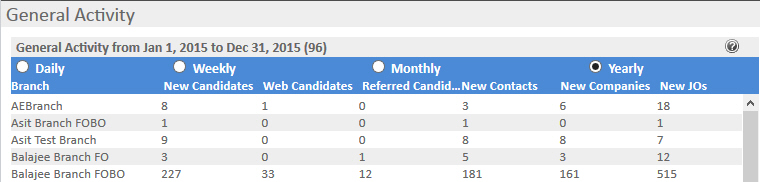
- The dashboard defaults to a Monthly View with a date range for the calendar month in which today's date falls. To change the date range select from the radio buttons beside Daily, Weekly, Monthly or Yearly.
Data Conditions
Date Range
- Daily – Today’s activity.
- Weekly – This week’s activity (Proceeding Sunday through following Saturday).
- Monthly – This month’s activity (1st through end of the current month).
- Yearly – This year’s activity (January 1st through December 31st of the current year).
New Candidates
- The candidate creation date falls within the date range.
- The entity role is Candidate or Supplier Candidate.
Web Candidates
- The candidate creation date falls within the date range.
- The candidate was created by __WebServiceUser_.
- The entity role is Candidate or Supplier Candidate.
Referred Candidates
- The candidate creation date falls within the date range.
- The candidate source is Referral.
- The entity role is Candidate or Supplier Candidate.
New Contacts
- The contact creation date falls within the date range.
- The entity role is Contact or Supplier Contact.
New Companies
- The company creation date falls within the date range.
- The entity role is Client, Prospect, Lead or Supplier.
New Job Orders
- The job order creation date falls within the date range.
- The entity role is Contract or Direct.
Was this helpful?