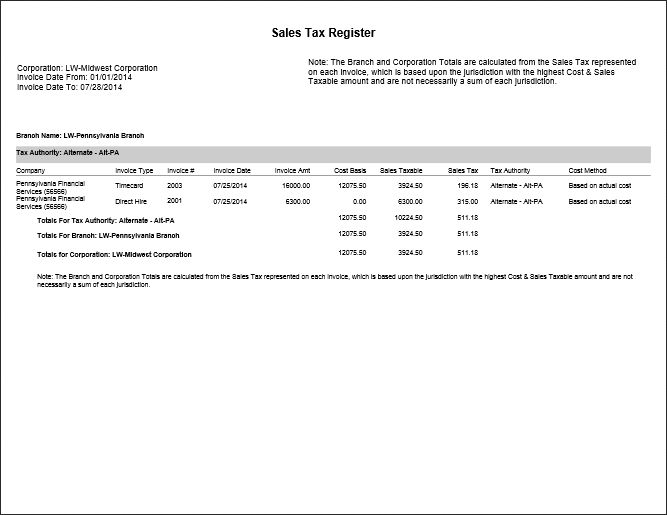
Sales Tax Register
The Sales Tax Register provides a listing of sales taxable amounts and sales taxes billed on invoices. If no branch is selected, the report will include values for all company branches to which the user has access. The totals are shown by Tax Authority. If no Tax Authority is selected, all will be presented.
- AccessReporting>Reporting & Analytics >System Reports > Billing.
- Double-click Sales Tax Register to open workflow view in a new window.
-
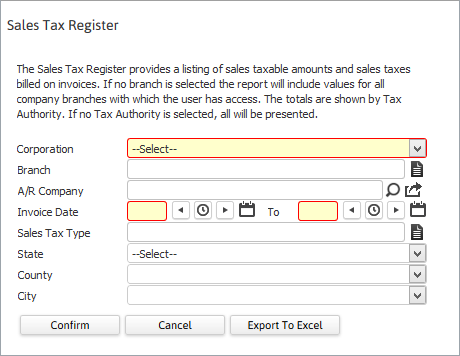
The Sales Tax Register workflow will open for selection criteria input.
- While updating the form, fields marked in red are required to complete the workflow. Click on the buttons to the right of certain fields to open a new window which will allow you to search and select options related to that specific field or choose a date.
- Select a corporation and Invoice Date range.
-
Branch Name, A/R Company, Sales Tax Type, State, County and City are additional optional criteria to further filter the report.
The City droplist is dependent on the State and County, while the County droplist is dependent on the State.
If you select a specific state, county or city...then the report only displays information for the taxing authority.
-
After entering the criteria click Confirm to generate the report.
- Select Export to Excel to open the report as a csv file.
-
The report opens in a new window.
- The header displays report name and criteria used to generate the report.
- The data is then grouped by Corporation > Branch > Tax Authority.
-
Calculations in report:
-
Total Cost Basis, Sales Taxable Amount and Sales Tax by Tax Authority, Branch and Corporation.
The Branch and Corporation Totals are calculated from the Sales Tax represented on each invoice, which is based upon the jurisdiction with the highest Cost & Sales Taxable amount and are not necessarily a sum of each jurisdiction.
-
Full Report