Sidebar Tempworks - Using Features
Each ATS in the Bullhorn Sourcing Accelerator could have unique features specifically for that ATS. You can become familiar with the features of Tempworks with the following reference:
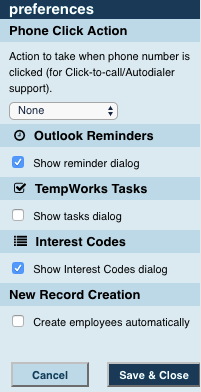
- Show Reminder Dialog: If this feature is enabled you can automatically set a reminder to a candidate while logging a note. Simply enter a keyword in your message that corresponds to the task time options, or manually assign a task time option by using the provided checkbox.
- Show Tasks Dialog: If this feature is enabled you can automatically assign a task to a candidate while logging a note. Simply enter a keyword in your message that corresponds to the task time options, or manually assign a task time option by using the provided checkbox.
- Show Interest Code Dialog: If this feature is enabled you can add an interest code to your candidate. The interest codes that are available to you will depend on what interest codes are created on your current ATS.
- Create candidate automatically: If this feature is enabled you will automatically create a candidate into your ATS upon visiting the candidate's profile page. If you choose to disable it you can still create a candidate by selecting "Create Candidate" in the Candidate Notes section of the Sourcing Accelerator.