Remove Bullhorn Sourcing Accelerator Extension from Chrome
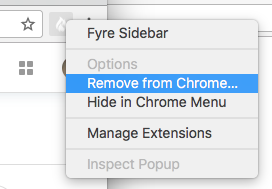
To remove the Bullhorn Sourcing Accelerator Extension from Google Chrome you can simply find the Bullhorn Sourcing Accelerator icon in the top right corner of your browser and right click on it. The following menu will appear with the option of "Remove from Chrome". You will then be prompted if you wish to remove Bullhorn Sourcing Accelerator. Click "Remove" to finalize.