Sales Tax Rate Manager
Sales Tax Rate Manager (STRM) removes the necessity of manually updating state sales tax rates and ensures you receive up-to-date information. STRM imports state sales tax rates every month, automatically updating your sales tax rates and groups related to the taxable states included in your Pay & Bill settings. The sales tax rates and groups associated with the location added on a placement are used when calculating billable charges on an invoice.
Requirements
STRM requires you to:
- Have a Workato license.
-
Have sales tax rate and tax group action entitlements enabled.
Note: If you're unable to create or edit Sales Tax Rates or Tax Groups, contact Bullhorn Support to review and adjust your action entitlements.
-
A Non-Production Environment.
Schedule
An initial data load is pushed when you subscribe for the first time, and rates are updated automatically on the 28th of every month going forward.
Adding Taxable States
- Navigate to Menu > Admin > Pay & Bill Settings.
-
Add the Taxable States from the picker.
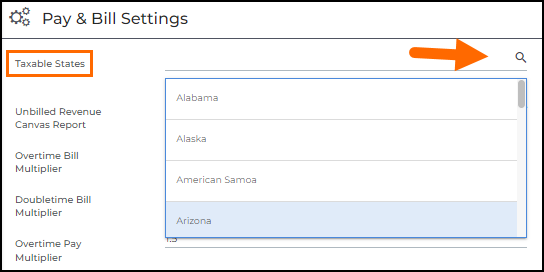
- Click Save.
| Entity | Field Name | Required? | Additional Details |
|---|---|---|---|
| Sales Tax Rate | taxJurisdictionTypeLookupID | Y | |
| jurisdictionName | Y | ||
| stateID | Y | ||
| rate | Y | This is a percentage. | |
| reportingCodeName | N | ||
| label | Y | Follows jurisdictionName | |
| userID | Y | ||
| amount | N | There cannot be an amount($) if rate is filled out. | |
| effectiveDate | Y | ||
| General Ledger Account Mapping | The GL segments are usually set up in the general ledger account table to define the account number. This is provided by the client, if necessary. | ||
| Sales Tax Group | zipcode | Y | |
| zipPlus4Low | N | Hidden during config set-up | |
| zipPlus4High | N | Hidden during config set-up | |
| stateSalesTaxRateID | Y (if applicable to group) | ||
| countySalesTaxRateID | Y (if applicable to group) | ||
| citySalesTaxRateID | Y (if applicable to group) | ||
| otherSalesTaxRates | N | ||
| totalRate | Y | This is a summation of all applicable rates, marked as percentage. | |
| districtSalesTaxRateID | Y (if applicable to group) | ||
| externalID | Y | ||
| label | Y | City | County | State | Zip Code | |
| stateID | Y | ||
| taxStatusLookupID | Y | ||
| taxOnMarginEnabled | Y | If it's a PA tax group, this will be marked as “Yes”. |
Was this helpful?