Hours Exception Report
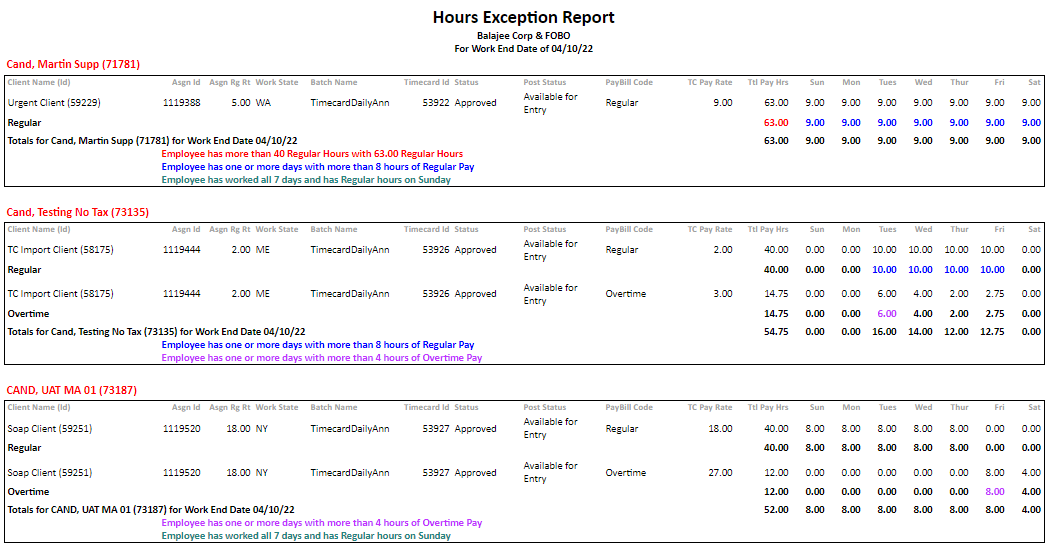
The Hours Exception Report provides hourly timecard details and includes exception messages for regular hours over 8 in a day or 40 in a week, overtime exceptions for more than 4 OT in a day, and an exception for working 7 days in a row.
As the current proofing register will only take timesheets within the same batch into consideration, this allows for reviewing totals for the entire period, even if they are on different timecards.
- Access Reporting > Reporting & Analytics > System Reports > Payroll.
- Select Hours Exception Report to enter report criteria.
- After selecting the report, the Workers Compensation Report workflow will open for selection criteria input.
- Click on the buttons to the right of certain fields to open a new window which will allow you to search and select options related to that specific field or choose a date.
- Select a Corporation and a Work End Date.
- Branch Name and Worksite State are both optional processing criteria and can be used to further define the information you want to see on the report.
- After entering the criteria, click Okay to generate the report.
- The report opens in a new window.
- If no data matches the input parameters, an error message will be displayed:

- The report’s header indicates Title, chosen Corporation, and the Work End Date.
- If no data matches the input parameters, an error message will be displayed:
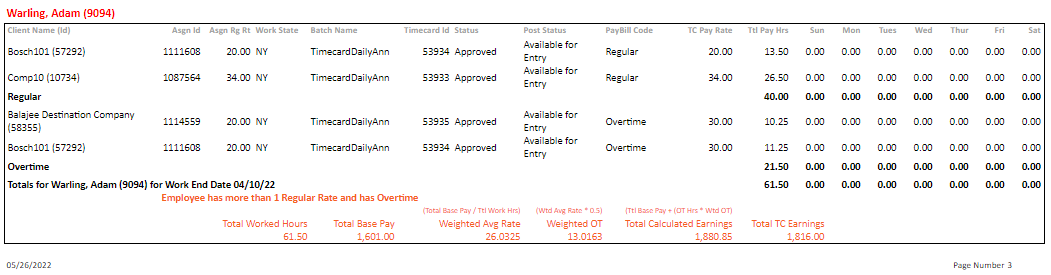
- Returned data is grouped by Candidate, Regular or Overtime hours, and is then listed by Client and Assignment with totals provided.
Calculations in Report
- A Weighted Average (Blended) Rate calculation is used for candidates with multiple timesheets with at least 2 different assignment regular pay rates and over 40 hours.
Weighted Overtime Calculations
You can follow these steps for calculating overtime with multiple different pay rates:
- Determine the employee’s Total Base Pay.
- For each timecard with different rates, multiply the number of hours worked by the regular hourly rate from the assignment.
- Add all wages as calculated in 1a to determine the Total Base Pay.
- Calculate the Weighted Average Rate.
- Divide the Total Base Pay by the Total Worked Hours.
- Calculate the Weighted Overtime Total.
- Multiply the Weighted Average Rate by 0.5 to determine the rate to be used to calculate blended overtime.
- Multiply the blended overtime rate by the total overtime hours for all timecards.
- Calculate the total earnings.
- Add the Total Base Pay and the weighted overtime total.

Example:
Employee works:
20 hours @ $20
20 hours @ $15
10 hours @ $10
50 hours worked total.
- Calculate Total Base Pay:
- 20 x $20 + 20 x $15 + 10 x $10 = $800
- Calculate Weighted Average Rate:
- $800 / 50 = $16
- Calculate Weighted Overtime Total:
- $16 x 0.5 = $8
- $8 x 10 = $80
- Calculate Total Earnings:
- $800 + $80 = $880
Full Report
Was this helpful?