Re Run Search
Use these instructions to re-run a search using the same criteria as in the original search; the purpose of this workflow is too look for new results without the need to open the search template.
- Mouse over Searching on the navigator and select Saved Results from the fly-out menu.
- After selecting Saved Results, results from previously run searches display in the main screen.
- After selecting the search to update from the results section, click the Activities drop-list. SelectBatch Processes > Re Run Search in the Search Task Bar.
-
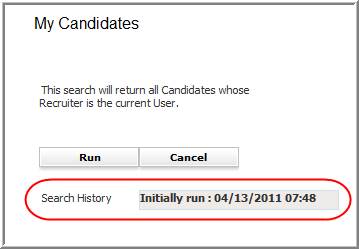
The Re Run Search will open the original search template will open in a new window.
Some searches cannot be re-run; you will receive a message if the search can not be re-run.
-
If the original search was a quick search click run to execute the search; if it was an advanced search, review the criteria and modify as necessary and click run to execute.
The Search History is populated from the saved search selected in the beginning of the workflow. This line gives you information on when the original search was first run.
-
From the original search a new list of records will display that match the new criteria used.