Using SMS Timesheets
SMS Timesheets allows Placements to record and submit their hours through SMS text message. AI then parses the information into the appropriate timesheet. This gives Placements a quick and easy way to submit their weekly hours and supports Admins by reducing the manual effort it takes to chase and enter time.
Your agency must enable you to use this feature. If you are not enabled to use SMS Timesheets you will receive an error message.
Follow the steps below to use SMS Timesheets to submit your time.
Steps to Submit Time Using SMS Timesheets
-
Text "Start <employee Last Name>" to 229-526-1968. For example, "Start Jones".
-
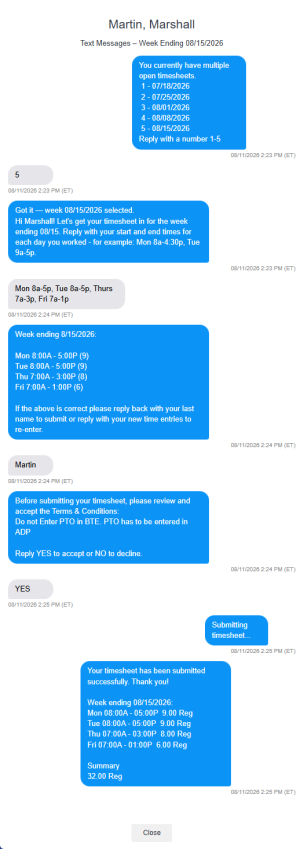
Follow the prompts to choose which week to enter time for and submit your hours.
After you complete all the prompts and successfully submit your time, your timesheet is parsed into to be reviewed and approved.
Example Text Thread Prompting
SMS Timesheets will prompt you for timesheet information in the following order:
-
Timesheet week
-
Hours for the chosen week
-
Dates and hours verification
-
Identity verification for submission (Last Name Verification)
-
Any additional verification set up by the agency
-
Verifies timesheet was successfully submitted