Client Assignments and Placements
Use these instructions for viewing and modifying the Assignments and Placements Segment of a Client.
- Select Assignments and Placements in the segments drop-list.
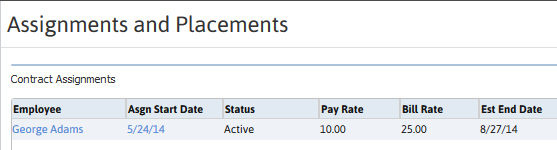
- The Assignments and Placements Segment lists all Contract Assignments and Direct Placements associated with the Client.
- Adding an Assignment or Placement to the list can be done from the Submittal Tracking Segment of the Contract or Direct Job Order records.
- To access the Assignment or Placement record click on the Start Date links in the list boxes.
-
This segment is divided into sections, with the top section displaying information regarding all Contract Assignments.
-
Scroll down to the next section to view information on all Direct Placements.

Was this helpful?