Add Contact to Sales Studio
Use these instructions to add the contact/supplier contact record to the My Contacts folders used in the Sales Studio.
- Select Add to Sales Studio from the Contact's (or Supplier Contact's) Activities drop-list. You can also run this from a Lead, Client or Prospect record and all associated contacts will be added to Sales Studios.
- The Add Contact(s) to Sales Studio workflow will open in a new window.
-
Select the preferred folder and OK the workflow to complete.
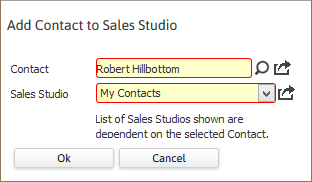
In the case of Leads, Clients and Prospects, the Contact field shown above will read Company instead.
- A confirmation message will display to confirm the contact is now listed under that My Contacts folder in the adapt.studio’s Sales Studio widget.
Was this helpful?