Clients by Source Report in CSV
The client by source report is used to track sourcing for clients. This is a non-detailed report that lists the clients, their account manager and source of record.
- Access Reporting > Reporting & Analytics > System Reports > Sales.
- Double-click on Clients by Source (csv) to open the workflow view in a new window.
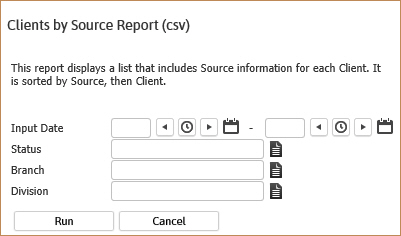
- In the form, click on the buttons to the right of certain fields to open a new window which will allow you to search and select options related to that specific field or choose a date.
- The Input Dates is the date range the client records are created in Adapt; and the Status is the current status of the client. So, if you are looking for the source of all clients who were created this month and are currently working enter dates from the 1st through the 30th/31st and status of Employee/Placed.
- The Branch and Division are additional criteria options to further filter the report results. These options will match the client record.
-
Click run to generate the report.
- Because this is a csv report you will receive an option to open or save the report. Select open to proceed or save to review later.
-
The header displays the report name and labels for the data to be displayed. The data is sorted by the Client.

Field names are not bold in the actual report.
Full Report
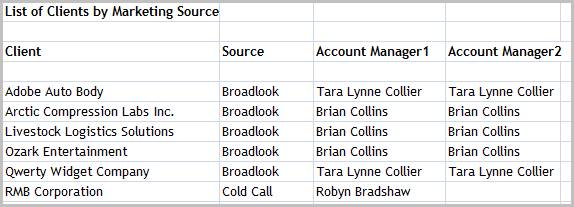
Field names are not bold in the actual report.
Workflows that Update Report
The following workflows will update the Clients by Source report:
Was this helpful?