Merge Company
In order to improve efficiency and sales process, duplicate records can be removed by merging Company records. This merging process allows the removal of the duplicate record without losing critical data.
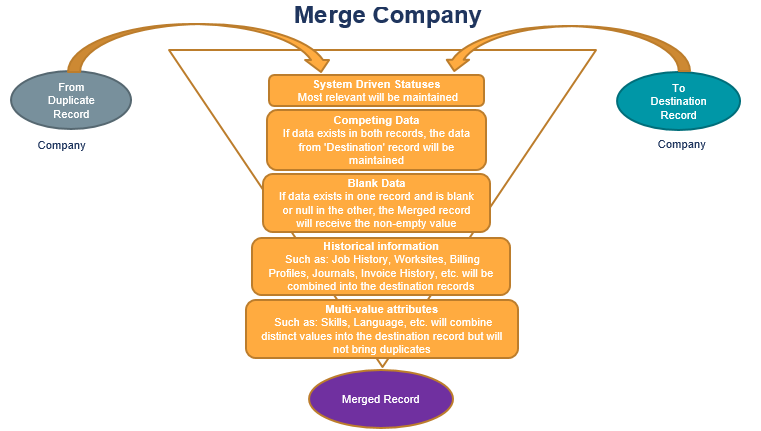
Use the Merge Company option to merge duplicate company records existing in the system. The 'duplicate' record is merged with the 'destination' record.
You must have 'Merge Company/Contact Records' permission to merge company records.
- Mouse over Administration on the main navigator and then select Administration.
- Select Merge Company from the General Administration section of the segment to access the component.
- The CompanyMerge screen displays.
- Enter the duplicate record's Company name in the Company field on the Duplicate Record section. While you type in the Company name, auto-suggest lists the records existing in the system matching the typed in name.
- Select the Company to be merged from the listed names. The basic information of the duplicate Company is presented to make sure you have selected the correct record.
- Enter the destination record's Company name in the Company field on the Destination Record section. While you type in the Company name, auto-suggest lists the records existing in the system matching the typed in name.
-
Select the Company to be merged into from the listed names. The basic information of the destination Company is presented to make sure you have selected the correct record.
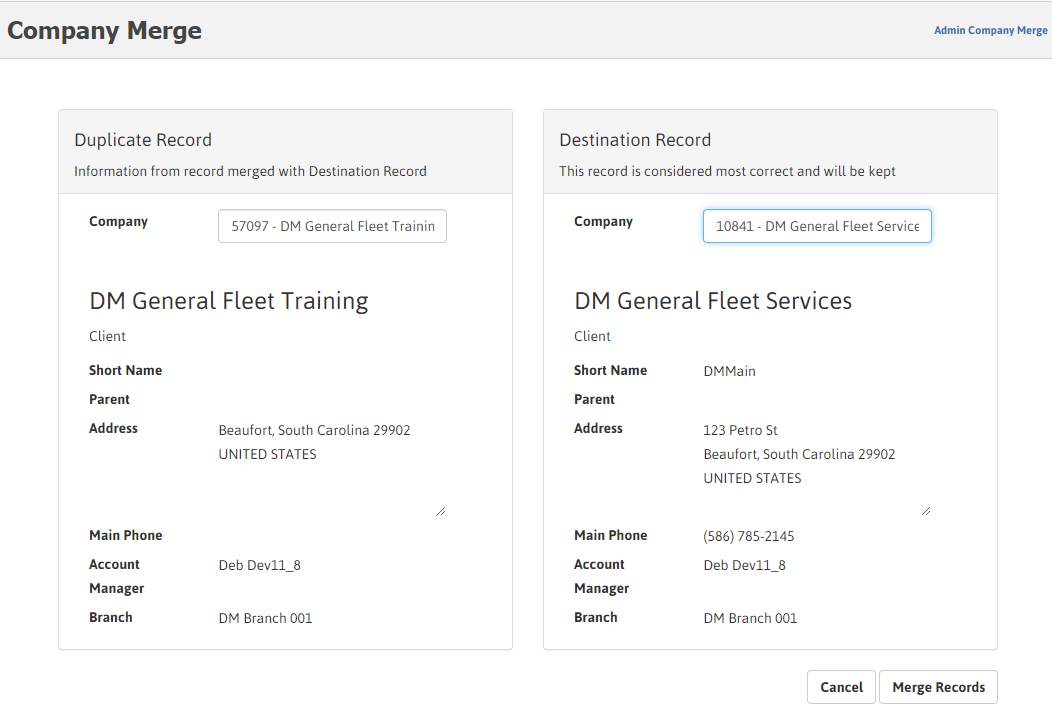
- Once you have verified that the duplicate and destination records selected are correct, click Merge Records. A popup seeking your confirmation to go ahead with the merging displays.
-
Select Yes. A message displays indicating that duplicate record is merged with the destination record.
While the merge process is in progress and may take time, an 'in process' message is displayed.
The following rules apply while merging the Company records:
- The Duplicate record is removed and the Destination Record remains.
- If data exists in both records, the data from 'Destination' record is maintained.
- If data exists in one record and is blank or null in the other, the Merged record receives the existing data.
- Historical information such as Job History, Journal, Invoice History, etc, is combined into the destination record.
- Multi-value attributes combines distinct values into the destination record but does not keep duplicates.
- The Merge Company feature applies for Client, Lead, Prospect or Supplier Role. However, the duplicate and destination records must be of the same role.
Upon completion of a Company merge, a 'Record Merged' notification is sent and a journal entry is created on the destination record indicating that the record was merged.
The Journal entry contains the following:
- Date / Time / User
- Duplicate Company from which the record was merged {although the record will no longer be available, the Company Name (ID), Short Name, Parent, Address/City/State/Postal Code, Main Phone, Account Manager, Branch, is noted, if they were changed from the duplicate record}.