Natural Language List Building (Generate List)
Early Access: Natural Language List Building is currently available to a limited group of users.
Natural Language List Building (Generate List) in Bullhorn Automation lets you build automation lists faster by describing what you need in plain language. Instead of manually configuring complex AND/OR logic or selecting multiple conditions, you can type a description and Amplify will automatically build the matching list criteria.
This feature saves time, reduces setup errors, and keeps your data consistent across automations.
What is Natural Language List Building?
Natural Language List Building uses language model technology to translate everyday descriptions into structured list criteria.
For example, you can enter phrases like:
-
“Candidates who haven’t had a placement or submission in the last six months”
-
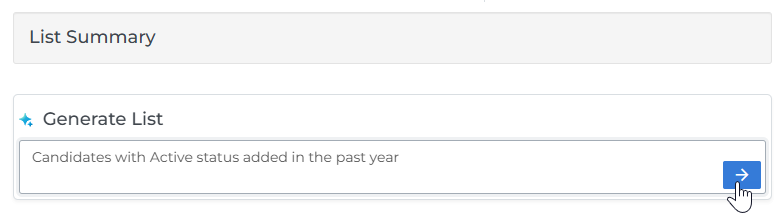
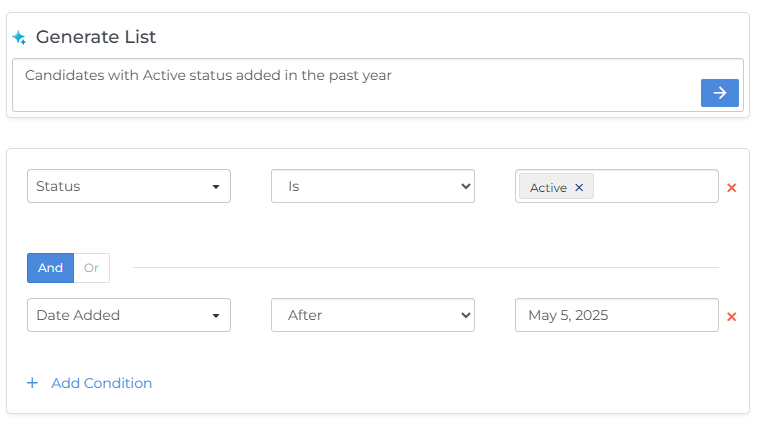
“Candidates with Active status added in the past year”
Amplify interprets your description and builds the list conditions automatically. You can review and edit the generated criteria before saving, so you always remain in full control of your list setup.
Natural Language List Building is available for any record type.
Natural Language List Building is optional. If you prefer to build your lists manually, you can simply ignore the Generate List field and build your conditions as normal.
How to Use Natural Language List Building
-
In Bullhorn Automation, create or edit an automation..
-
In the Generate List field, type a description of the list you want to build in plain language.
-
Press Enter or click the arrow to generate your criteria.
-
Amplify interprets your request and displays the resulting conditions.
-
Review and adjust the generated criteria as needed, then save.
Tips for Getting Good Results
-
Keep it simple: Use straightforward phrasing and focus on what you want at a high level.
-
Be specific: Include details like job titles, statuses, skills, or locations to narrow results.
-
Use natural phrasing: Write as if you’re describing the request to a colleague.
-
Always review: Check the generated criteria before saving and tweak as needed to ensure it matches your intent.
-
Custom fields may affect accuracy. Custom fields vary between Bullhorn environments, so results may be less precise when your description references them. Always review the generated criteria carefully before saving.