Projects
Overview
Projects are a way to group together how chunks of time are spent during a employee's day on a specific assignment for one company.
Things to Know
- Projects can be created and managed by both Bullhorn Back Office Admins and Approving Managers
- Admins can manage projects from either the Companies tab or the Approvers tab.
- Approving Managers can manage projects from within their Approver Portals (if enabled).
- Simple Mode timesheets cannot be used with projects.
- Projects use the same bill and pay rates as the assignment they are applied to.
When to Use Projects
You can think of a project as a "task" your employee is responsible for over the course of their placement.
Example
Consultant John Smith is on an assignment for the company Acme Industries as an Analyst. While working as an Analyst, John is required to log how he breaks down his hours against various tasks he completes through the day. These tasks would be perfect for using projects.
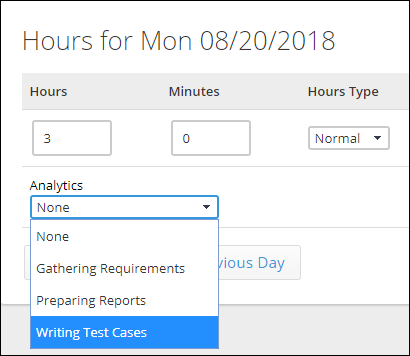
The specific projects Acme Industries wants John to track time against are:
- Gathering Requirements
- Writing Test Cases
- Preparing Reports
These projects can be added into Bullhorn Back Office and assigned to John's Analyst placement. When John enters his hours, he can select from these options to show how his time was applied in each area.
When Not to Use Projects
Projects would not be used if an employee has multiple placements with different companies.
- In this case, separate placements should be set up under each Company.
- Employees will be able to select which placement to enter time under in their Employee Portal.