Credit vs Credit & Reinstate
After finalizing an invoice you may find that you need to make an update to a financial field. Non-financial fields can be edited on finalized invoices, however to update any financial fields you'll need to Credit or Credit & Reinstate the invoice.
See Editing Invoices to learn how to edit invoices. Continue to the information below to learn when to Credit or Credit & Reinstate invoices.
Navigating to Credit or Credit & Reinstate
- Navigate to the Invoices List.
- Locate the finalized invoice you would like to credit. You can use Search and the column filters to narrow your selection.
- Open the invoice.
-
From the Actions drop-down, select either Credit or
Credit & Reinstate.
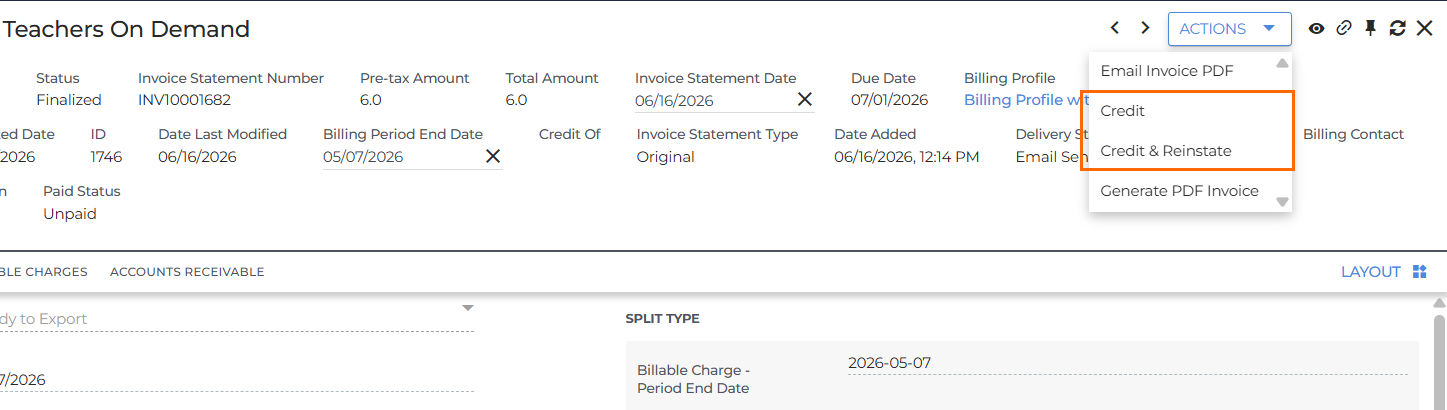
The Difference Between Credit and Credit & Reinstate
-
Credit: Crediting an invoice writes off revenue from all billable charges for the selected invoice(s) and creates a Credit Memo/Invoice.
-
Credit & Reinstate: Crediting and reinstating an invoice writes off revenue from all billable charges and creates a credit as above, but also releases all of the billable charges on the selected invoice so they can be invoiced again.
Credit Invoice Record Changes
When using Credit, the following record changes occur:
- The original billable charge(s) will be offset with negative amounts and be set to a status of Unbillable.
-
Creates a new Credit Memo/Invoice that:
- Displays the offset values.
- Links to the Original Invoice Statement.
-
Sets the Invoice Status based on the Billing Profile:
- If Approval Required, set the Invoice Status = New.
- If Approval not Required, set the Invoice Status = Ready.
-
Allows user to update the following fields:
- Invoice Status
- Invoice Date
- Remit Instructions
- Has an Invoice Type = Credit - Write-Off.
Credit Invoice Actions
users can do the following to a Credit Invoice:
- Add a comment to the header.
- Update the Invoice Date.
- Add a file.
- Change the Invoice Status and move through the invoice workflow to finalized.
users cannot do the following to a Credit Invoice:
- Update any fields beyond those listed above.
- Credit the finalized invoice.
Credit & Reinstate Record Changes
When using Credit & Reinstate, the following record changes occur:
-
A Credit Memo/Invoice is created.
- The credit memo has an Invoice Type = Credit - Reinstated.
- The credit memo is listed on the Invoice list with the next available invoice number.
-
New Billable Charges associated with the original records are created
with positive amounts.
- The new Billable Charges will have a status of "Ready to Bill". See Creating Invoices from Billable Charges for more information.
You must have the appropriate action entitlements in order to create or edit Invoice Statements. Please contact Bullhorn Support to review and adjust your action entitlements as needed.