Amplify Screening: Multilingual Screening Support
Amplify Screening
What’s new?
You can now enable the translation of job screening questions into other languages. When enabled, the screener detects the candidate’s browser language and offers translation support. This feature is currently in early access, so functionality may change as we continue refining it.
Why does it matter?
Letting candidates complete their screening in the language they’re most comfortable with creates a fairer, more consistent, and user-friendly experience across regions.
How do I enable this?
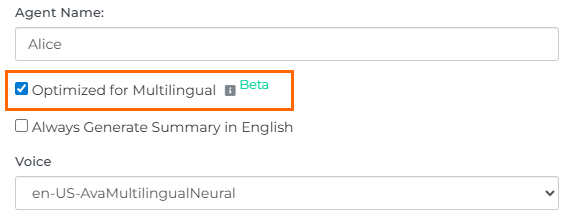
This update is automatically available for all customers using Amplify Screener with Bullhorn Automation Amplify Edition. To use it, open your screener engagement and select Optimized for Multilingual within your Voice Screener question settings. You’ll also see the option Always Generate Summary in English. If enabled, the transcript with the summary will always be generated in English, regardless of the language the candidate used.
For a full guide to this feature and a list of supported languages, see this article: “Optimized for Multilingual” Amplify Screener Setting.