Amplify Verify Fields in Bullhorn Automation
Amplify Verify is currently in Early Access. For more information, speak to your Bullhorn representative.
Amplify Verify evaluates candidates for signals related to identity, behavioral patterns, misrepresentation, and consistency across their interactions with your company. The results are written back to fields on the candidate record in the ATS and are also available as list criteria in Bullhorn Automation, so you can use them to enroll or exclude candidates.
Using Verify Fields in Automation Lists
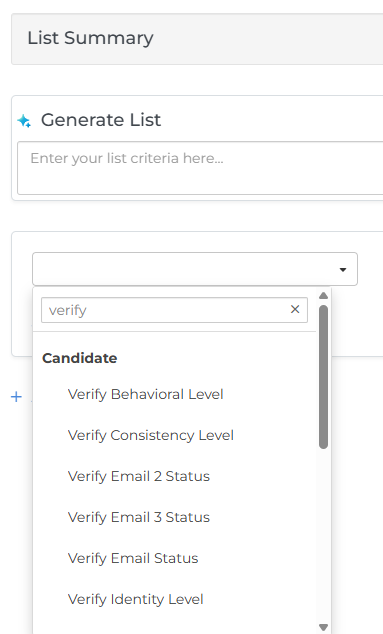
When building list criteria, type Verify in the list criteria dropdown to see all available Verify fields.
Verify Field Reference
Verify Level Fields
Verify Level fields let you build lists based on a candidate’s overall Verify Level (all signal categories combined), the level for each individual signal category, the previous overall Verify Level, and the date the level last changed.
The Verify Level field and each of the four category level fields (Identity, Behavioral, Misrepresentation, and Consistency) can have the following values: Clear, Flagged, Needs Review, or No Signal Data.
| Field Name | Definition |
|---|---|
|
Verify Level |
The candidate’s current overall Verify classification, based on all four category levels combined. |
|
Previous Verify Level |
The candidate’s previous overall Verify Level. |
|
Date Level Last Changed |
The date and time the candidate’s Verify Level last changed |
|
Identity Level |
Indicates whether the person engaging is who they claim to be (for example, identity document consistency and session authenticity). |
|
Behavioral Level |
Indicates whether a candidate’s interaction patterns are anomalous (for example, unusual submission velocity or bot-like behavior). |
|
Misrepresentation Level |
Indicates whether what a candidate claims is inconsistent with what is verifiable (for example, resume vs. credential checks). |
|
Consistency Level |
Indicates whether a candidate’s profile data has changed across interactions in ways that suggest fraud or identity sharing. |
|
Summary |
A plain-language explanation of the evaluation result that gives recruiters enough context to make a decision. Amplify Verify writes this value automatically, and it isn’t editable. |
Contact Verification Status Fields
These fields let you build lists based on the verification status of a candidate’s phone numbers and email addresses. Each email and phone field has its own status, so you can target specific fields.
Email field status can be: Verified, Undeliverable, Risky, or null.
Phone field status can be: Verified, Invalid, VoIP, or null.
| Field Name | Definition |
|---|---|
| Email Status | The verification status of the address in the candidate’s Email field. |
| Email 2 Status | The verification status of the address in the candidate’s Email 2 field. |
| Email 3 Status | The verification status of the address in the candidate’s Email 3 field. |
| Phone Status | The verification status of the number in the candidate’s Phone field. |
| Phone 2 Status | The verification status of the number in the candidate’s Phone 2 field. |
| Phone 3 Status | The verification status of the number in the candidate’s Phone 3 field. |
| Mobile Status | The verification status of the number in the candidate’s Mobile field. |
| Work Phone Status | The verification status of the number in the candidate’s Work Phone field. |
Automation Example: Verify Level Change Notification
To notify recruiters in near real time when one of their candidates is flagged, use the Amplify Verify - Notify Candidate Owner When Candidate is Flagged blueprint. This automation emails the candidate owner whenever a candidate’s Verify Level changes to Flagged.
For a step-by-step breakdown, see Notify recruiters when a candidate is flagged.