GL Export Exception Report
The GL Export Exception Report gives you quick access to those transactions that have been posted/updated but not yet exported.
Users must have Financial Admin Report Category permission to access this report.
The report returns a list of transactions with a document date matching the selected date range:
- Timecard Transactions Posted but not Exported
- Timecard Transaction Actual Burdens Updated but not Exported
- Direct Hire Transactions Posted but not Exported
- Timecard Billing Adjustment Transactions Posted but not Exported
- Direct Hire Billing Adjustment Transactions Posted but not Exported
- AR Adjustments Posted but not Exported
- AR Payments Posted but not Exported
- Checks or Advices Updated but not Exported
- Payroll Adjustments Posted but not Exported
- Voids Posted but not Exported
Accessing the Report
-
Access Reporting>Reporting & Analytics >System Reports > Financial Administration.
-
Double-click GL Export Exception Reportto open workflow view in a new window.
-
The following window displays:
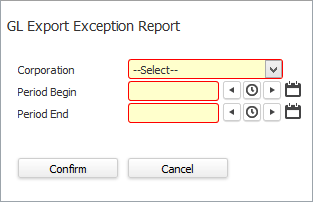
- In the Corporation field, use the droplist to select the corporation for which you want to run this report (REQUIRED).
- In the Period Begin and Period End fields, enter the date range on which you want to search (REQUIRED).
- When you are satisfied with your selections, click Confirm.
The GL Export Exception Report
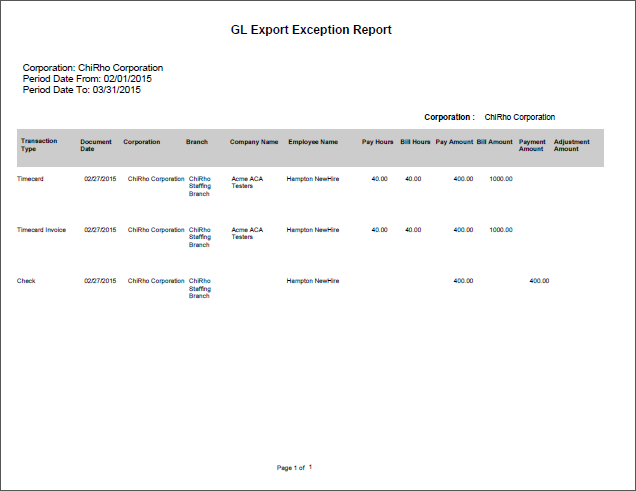
The report is grouped and totaled by:
- Corporation
- Transaction Type
- Branch (Assignment Branch for Timecard/DH, Company Branch for Invoices, Employee Branch for Payroll and Batch Branch for remaining transaction types).
The report is sorted by:
- Transaction Type
- Branch
- Company
- Employee Last Name
- Employee First Name
The report shows the following information:
- Transaction Type
- Document Date
- Corporation
- Branch
- Company Name
- Employee Name
- Account Manager
- Pay Hours
- Bill Hours
- Pay Amount
- Bill Amount
- Payment Amount
- Adjustment Amount
Was this helpful?