PayBill Transaction Register
The PayBill Transaction Register allows you to have a summary view of total pay amount and bill amount by paybill code based on the sales posting date.
Users must have Financial Admin Report Category permission to access this report.
Accessing the Report
- Access Reporting>Reporting & Analytics >System Reports > Financial Administration.
- Double-click PayBill Transaction Registerto open workflow view in a new window.
-
The following window displays:
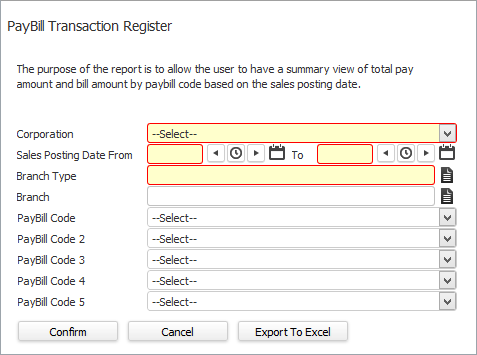
- In the Corporation field, use the droplist to select the corporation for which you want to run this report (REQUIRED).
- In the Sales Posting Date From and To fields, enter the date range on which you want to search (REQUIRED).
- In the Branch Type field, use the Code Selection icon to select the Branch Type (Company, Employee or Order) on which to report (REQUIRED).
- In the Branch field, use the Code Selection icon to select a specific branch or branches if you want to limit the information returned on the report. This is optional. If nothing is selected, all active branches with which you have security access are returned.
- In the PayBill Code fields, use the droplist to select specific paybill codes on which to report. This field is optional. If it is blank, the system reports on all paybill codes.
- When you are satisfied with your selections, click ConfirmorExport to Excel.
Report Format
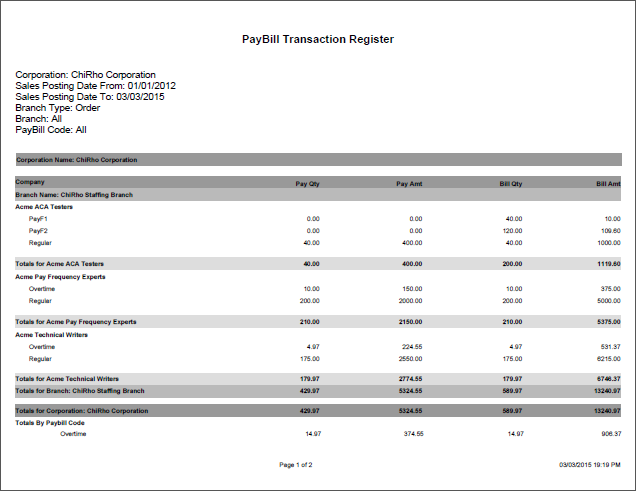
The report is grouped by:
- Corporation
- Branch
- Company
The report is totaled by:
- Corporation
- Branch
- Company
- PayBill Code
The report is sorted by:
- Branch
- Company
- PayBill Code
Was this helpful?