My Calls
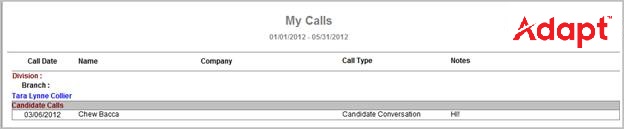
This report displays all call activity performed by the current User within the specified date range.
- Access Reporting > Reporting & Analytics > System Reports > General.
- In the My Calls Report window, use the Calendar control to select a date range on which to search. This is required.
- Once you are satisfied with your filtering criteria, click Run to generate the report.
- The header displays the report name and the date range selected.
- The data is sorted by Division, then Branch, then Type of Call (Candidate/Contact).
- The data displayed is the Call Date, Name, Company, Call Type and Notes.
- The data displayed is collected from the journal entries found on records that match the criteria used in the workflow.
Full Report
Workflows that Update Report
The following workflows will update the My Calls report:
- Log a Candidate Call
- Left Message workflow
- Log a Call outcomes
- Log a Contact Call
Was this helpful?