Our Calls
This report presents all call activity performed for all users within the specified date range.
- Access Reporting > Reporting & Analytics > System Reports > General > Our Calls.
- In the Our Calls Report window, use the Calendar control to select a date range on which to search. This is required.
- You can also use the Code Selection icons to select a Branch and/or Division to further filter the report. This is optional.
- Once you are satisfied with your filtering criteria, click Run to generate the report.
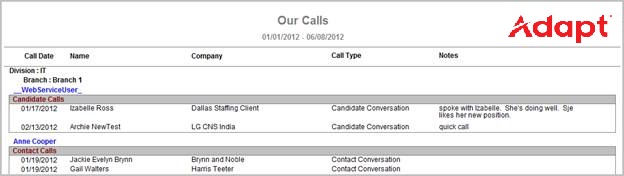
- The header displays the report name and the date range selected.
- The data is sorted by Division, then Branch, then User and then Type of Call (Candidate/Contact).
- The data displayed is the Call Date, Name, Company, Call Type and Notes.
- The From and To dates are pulled from journal postings with a date within the date range. This may not be the date the actually activity occurred. For example, a candidate may have been called yesterday but the activity in Adapt did not occur until today. If that is the case then activity will display on the report when today’s date is included in the date range.
Full Report
Workflows that Update Report
The following workflows will update the Our Calls report:
- Log a Candidate Call
- Left Message workflow
- Log a Contact Call
Was this helpful?