Top 10 Clients by Volume of JOs (Job Orders)
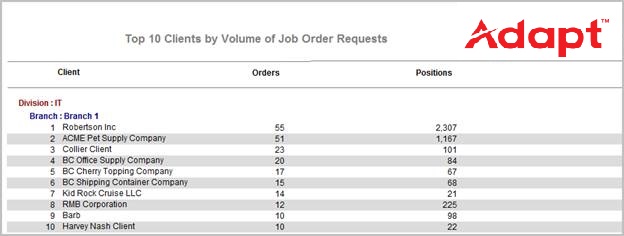
This report displays the Top 10 Clients by number of Active and Partial Filled Job Orders, both Contract and Direct.
- Access Reporting > Reporting & Analytics > System Reports > General > Top 10 Clients by Volume of JOs.
- In the Top 10 Clients by Volume of Job Orders Report window, use the Code Selection icons to select a Branch and/or Division to limit your search. These are optional. If you do not select either, the report will search all branches and divisions.
- Once you are satisfied with your filtering criteria, click Run to generate the report.
- The header displays the report name.
- The data is sorted by Division, then Branch and then Number of Job Orders (Orders).
-
The data displayed is the Client name and ranking (by Division and Branch) and the total number of Orders and Positions.
- Orders is calculated by adding the number of Contract Job Orders (with a status of "Active" or "Partial Fill") to the number of Direct Job Orders for the Client.
- Positions is calculated by adding the number required for all Contract Job Orders (with a status of "Active" and "Partial Fill") to the number required for all Direct Job Orders for the Client.
Full Report
Workflows that Update Report
The following workflows will update the Top 10 Clients by Volume of JOs report:
Was this helpful?