VMS Sync Data Flow
VMS Sync connects your VMS portal to Bullhorn ATS by pulling job orders, normalizing position data, applying account rules, and creating or updating records automatically. The following steps describe how data moves through the workflow from initial authentication to final record creation and candidate submission.
Full Data Flow
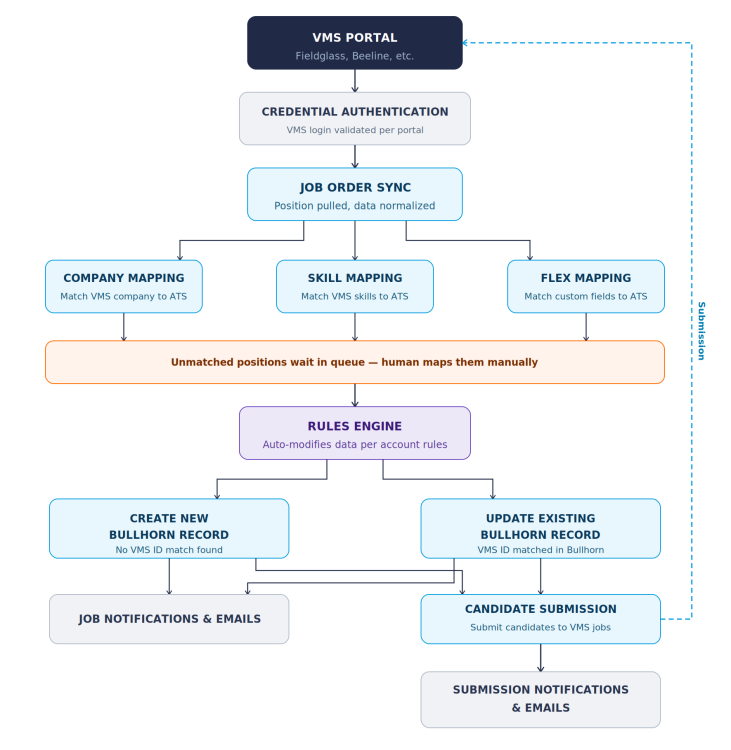
The steps below detail the stages in which data flows through . View the diagram and written steps the fully understand how moves your data.
-
VMS Portal Connection & Credential Authentication : VMS Sync connects to your VMS portal (such as Fieldglass or Beeline) using your stored credentials. Authentication is validated per portal. See VMS Sync Portal Support List for a full list of Portals VMS Sync can connect with.
-
Job Order Sync: VMS Sync pulls position data from the VMS portal and normalizes it for use in Bullhorn ATS.
-
Data Mapping: VMS Sync runs three parallel mapping processes to align VMS data with ATS values.
- Company Mapping: Matches the VMS company to the corresponding ATS company record.
- Skill Mapping: Matches VMS skill values to the corresponding ATS skill values.
- Flex Mapping: Matches VMS custom fields to the corresponding ATS custom fields.
-
Manual Mapping for Unmatched Positions: If a position cannot be matched automatically during any of the mapping steps, it waits in a queue. A user reviews the queue and maps the unmatched values manually before the position can continue through the workflow.
-
Rules Engine (optional): Once mapping is complete, the Rules Engine automatically modifies position data according to the rules configured for your account.
The outcome of a rule may be to ignore position delivery/updates.
-
Record Creation or Update: VMS Sync checks whether the position already exists in Bullhorn by looking for a matching VMS ID.
- If no VMS ID match is found, VMS Sync creates a new Bullhorn record and sends Job notifications and emails.
- If a VMS ID match is found, VMS Sync updates the existing Bullhorn record.
Various settings control which fields are updated / overwritten (blacklist, ignore unchanged fields, etc.)
-
Candidate Submission: After a Bullhorn record is created or updated, Candidates can be submitted to the VMS Job. Submission notifications and emails are sent upon completion. The submission is then sent back to the VMS portal to close the loop.
In order to complete the Submission step, you must have VMS Submittals enabled.
Additional Resources
-
VMS Sync Overveiw: Learn what is at its core and explore common use cases.
-
Getting Started: Learn how to start using .
-
VMS Sync Maintenance Best Practices: Learn how to build consistent routines to keep your system running smoothly.