Add Workers Compensation Code Detail
This workflow associates a workers comp code with a corporation.
Permission for this component is granted via the manage workers compensation codes permission under the financial administration category; default with financial administration security profiles.
-
From the Manage Workers Compensation Code segment click the Add button below the list box.

-
The Add Workers Comp Detail workflow opens in a new window.
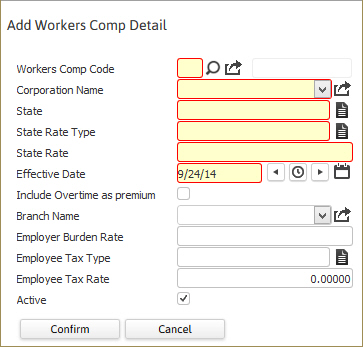
While updating the form, fields marked in red are required to complete the workflow. Click on the buttons to the right of certain fields to open a new window which will allow you to search and select options related to that specific field. The code and description can be up to 20 alpha-numeric characters; the code must be a unique value.
- Workers Comp Code - Select the appropriate code.
- Corporation - Select the Corporation for which this Workers Comp detail applies.
- State - Select the State for which the Workers Comp rate will be applied.
- State Rate Type - is either hours or dollars.
- State Rate – Enter the rate used to calculate workers compensation premiums. This rate will be used in calculating actual burden.
- Effective Date – The date on which this workers comp rate becomes effective.
- Include Overtime as Premium - If this flag is checked Overtime rates will be calculated as 1.5 times Regular rates. (The flag is unchecked by default)
- Branch - This allows the user to specify differing rates by Branch. If there are no branches selected in the Workers Comp Detail, the rate entered will be applied to ALL branches.
- Employer Burden Rate – Enter the rate to be used when calculating accrued burden.
- Employee Tax Type – Select the appropriate type of withholding for this workers comp code (only necessary for states with employee paid workers compensation).
- Employee Tax Rate – Enter the rate of withholding from the employee. The amount entered depends on the Employee Tax Type selected. Only necessary for states with employee paid workers compensation.
- Click complete to finish the workflow and add the detail record.
- The new workers compensation code is visible in the list box.