Delete Workers Compensation Code
This workflow removes a custom Workers Compensation Code; if the Workers Compensation Code is associated with an employee, timecard or paycheck, this workflow will not complete.
Permission for this component is granted via the manage Workers Compensation Codes permission under the financial administration category; default with financial administration profile.
- From the Manage Workers Compensation Codes segment, select a Workers Compensation Code and click the Delete button below the list box.
-
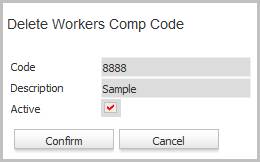
The delete confirmation will open in a new window.
- The deletion is not allowed if the Workers Compensation Code is used on a job order or assignment.
- If the code is in use, but no longer needed, edit the code and remove the active flag.
- If a workers comp code detail record exists the detail record will be removed as well.
- The Workers Compensation Code is deleted and no longer listed in the list box.
Was this helpful?