Update Workers Compensation Code Rates
These workflows add and edit rates for workers comp detail records. Permission for this component is granted via the manage workers compensation codes permission under the financial administration category; default with financial administration security profiles.
Add Workers Comp Code Rate
- From the General Information segment click the
 icon below the list box.
 -
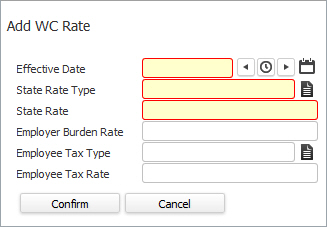
The Add Workers Comp Detail workflow opens in a new window.
- While updating the form, fields marked in red are required to complete the workflow. Click on the buttons to the right of certain fields to open a new window which will allow you to search and select options related to that specific field or choose a date.
-
Effective Date – The date on which this workers comp rate becomes effective.
The added workers comp rate is used until the system encounters a more recent Effective date. For example, workers comp rate 'A' and 'B' are added with effective date set as January 1st 2018 and November 1st 2018 respectively. In this case, the rate 'A' will stay valid from January 1st 2018 till October 31st 2018, but the system will start using rate 'B' from November 1st 2018 onwards, as it has the latest effective date.
- State Rate Type - is either hours or dollars.
- State Rate – Enter the rate used to calculate workers compensation premiums.This rate will be used in calculating actual burden.
- Employer Burden Rate – Enter the rate to be used when calculating accrued burden.
- Employee Tax Type – Select the appropriate type of withholding for this workers comp code (only necessary for states with employee paid workers compensation).
- Employee Tax Rate – Enter the rate of withholding from the employee. The amount entered depends on the Employee Tax Type selected. Only necessary for states with employee paid workers compensation.
- Click Confirm to finish the workflow and add the new rate.
- The new workers comp code rate is visible in the list box.
Edit Workers Comp Code Rate
- Select a record and click the
 icon to modify the rate.
 -
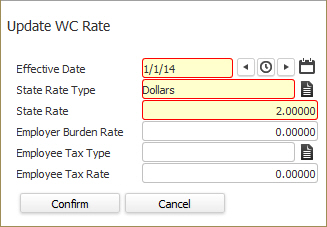
The Update WC Rate workflow opens in a new window.
- While updating the form, fields marked in red are required to complete the workflow. Click on the buttons to the right of certain fields to open a new window which will allow you to search and select options related to that specific field or choose a date.
- Click complete to finish the workflow and update the record.