Add Notification Type
This workflow creates a notification email record. The workflow is the same whether you are adding an internal or external notification.
However, the information on the notification record is different depending if you add an internal or external notification. To lean how to change the properties of an internal notification, see Edit Internal Notification. To learn how to change the properties of an external notification, Edit External Notification.
-
Select the Add Internal Notification or Add External Notification from the workflow menu on the Activities drop-list.
Internal Notifications
|
Notification |
Description |
|
1st Report of Injury |
Sent when claim is created. |
|
Auto Create Potential Duplicate Candidate from Broadbean |
Sent when the system auto creates potential duplicate candidate from Broadbean Search. |
|
Candidate Completed Onboarding Item on Portal |
Sent when the Candidate completes an onboarding item on the portal. |
|
Candidate Declined to eSign Onboarding Item on Portal |
Sent when the Candidate declines to eSign an onboarding item on the portal. |
|
Candidate Deleted LinkedIn Profile |
Sent when a Candidate has deleted LinkedIn Profile. |
|
Candidate Document Uploaded from Web |
Sent when the Candidate uploads document from the candidate Self Service portal. |
|
Candidate Unemployment Flag Updated. |
Sent when Candidate Unemployment Flag Changed. |
|
Change Contract Assignment Rates |
Sent when the pay and/or bill rates are changed on a contract assignment. |
|
Change Contract Job Rates |
Sent when the pay and/or bill rates are changed on a contract job order. |
|
Close Job Order |
Sent when a job order is closed. |
|
Compass Candidate Applied |
Sent when a Candidate applies for a job via Compass. |
|
Compass Candidate Profile Updated |
Sent when a Candidate updates My Profile information in Compass. |
|
Employee Direct Deposit Created, Updated or Deleted |
Sent when new direct deposit record added, updated or deleted under Employee Financial or from Compass Portal. |
|
End Contract Assignment |
Sent when a contract assignment is ended. |
|
I9 Form - Section One of the I9 form completed |
Sent when I9 form section one completed by the Candidate. |
|
LinkedIn Bulk Linking Error |
Notification email sent when an error is returned from Overnight Bulk Linking process. |
|
LinkedIn Limited Listing Job Posting Failure |
Notification email sent when a Job posted to AdaptCentral and/or LinkedIn Limited Listing fails. |
|
LinkedIn Seat Holder Retrieval Failure |
|
|
New Assignment Incident |
Sent when an incident is created from the Assignment. |
|
New Contract Assignment |
Sent when a candidate is assigned to a contract job order. |
|
New Contract Job from Web |
Sent when a new contract job is created via web services. |
|
New Contract Job Order |
Sent when a new contract job order is created within AdaptSuite. |
|
New Direct Job from Web |
Sent when a new Direct Job is created via web services. |
|
New Direct Job Order |
Sent when a new direct job order is created within AdaptSuite. |
|
New Direct Placement |
Sent when a candidate is placed on a direct job order. |
|
New Web Portal Candidate |
Sent when the Candidate completes the application on the candidate Self Service portal. |
|
Payroll Tax Record Added or Updated |
Sent when new payroll tax record added or updated under Employee Financial. |
|
Potential Duplicate from Broadbean Search |
Sent if the imported candidate from Broadbean is a potential duplicate. |
|
Reassign Candidate |
Sent when a candidate is re-assigned on a contract job order. |
|
Record Merged |
Sent when a Record Merge action is completed on a destination record. |
|
TempBuddy Failure Notification |
Sent when a failure occurs while sending a TempBuddy record to Adapt. |
|
Unemployment Claim Status Updated. |
|
|
VMS Req Converted to Job Opportunity |
Sent when an Opportunity is created from a VMS requisition. |
|
VMS Req Converted to Job Order |
Sent when a job order is created from a VMS requisition. |
|
VMS Req Failed |
Sent when the VMS Req failed during the import process. |
|
VMS Requisition Updated |
Sent when a VMS Req is updated. |
|
VMS: Automated Update to Converted VMS Req |
Sent when the system automatically updates the AdaptSuite Job Order. |
|
VMS: New Requisition |
Sent when a new VMS Requisition is created. |
|
WC Claim Status or Modified Duty Updated |
Sent when WC Claim status or modified duty indicator is updated. |
|
Web Portal Candidate My Profile Updated |
Sent when the Candidate updates My Profile from the candidate self service portal. |
|
WOTC Questionnaire Completed by Candidate |
Sent when WOTC Form 8850 has been completed by the Candidate. |
External Notifications
|
Candidate Assigned |
Sent when a Candidate is Assigned to a Contract Job. |
|
Candidate Submitted - Contract |
Sent when a Candidate has been Submitted to a Job. |
|
Candidate/Supplier Candidate Password Reset |
Sent when a Candidate successfully Resets their Password. |
|
Compass Candidate Applied |
Sent when a Candidate applies for a job via Compass. |
|
Compass Candidate/Supplier Candidate Reset Password Request |
Sent when a password reset is requested. |
|
Compass Candidate/Supplier Candidate Sign Up with Code |
Sent when Generate Code is initiated for the Candidate |
|
Compass Candidate/Supplier Candidate Timesheet Approved |
Sent when a Candidate's/Supplier Candidate's Timesheet is Approved by Approvers. |
|
Compass Candidate/Supplier Candidate Timesheet Rejected |
Sent when a Candidate's Timesheet is Rejected by Approvers. |
|
Compass Contact/Supplier Contact Reset Password Request |
Sent when a Password Reset is requested for a Contact. |
|
Compass Contact/Supplier Contact Sign Up with Code |
Sent to Contact when Generate Code is intiated. |
|
Document eSigned |
Sent when the Candidate eSigns a document. |
|
New Candidate from Portal |
Sent when a New Candidate Signs Up on the Compass Portal. |
|
New Contact from Portal |
Sent when a New Contact Signs Up on the Compass Portal. |
|
OB Item Assigned |
Sent when the Candidate is assigned to an onboarding item. |
|
OB Item Completed |
Sent when the Candidate completes an onboarding item. |
|
Release Job Order to Supplier |
Sent when a Job Order is Released to Supplier |
|
Timesheet Approval Needed |
Sent to Approvers when Timesheet submitted from Mobile Portal. |
|
Candidate Assigned |
Sent when a Candidate is Assigned to a Contract Job. |
|
Candidate Submitted - Contract |
Sent when a Candidate has been Submitted to a Job. |
-
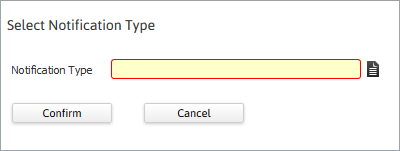
The Select Notification Type workflow opens in a new window.
-
Click the Code Selection icon on the Notification Type field.
-
Select the workflow for which you want to set up a notification and click OK.
-
You are taken back to the Select Notification Type page with the selected notification type in the Notification Type field. Click Confirm.
If you select a workflow for which a notification has already been set up, the system will present a message indicating that the notification type already exists. The system allows one Notification set-up per workflow (or Notification Type). If the Notification has already been set up, you can edit the record.
-
The system re-displays the Manage Notifications page with the notification added to the list. To edit its properties, click the link in the Notification Type column.