Form 941 Schedule A Worksheet
This report presents summary information from the Government Reporting process to assist in completing the quarterly IRS Form 941 with liability amounts provided by month within the quarter. The report can be run for the specific quarter within the year. You may also reference the Detailed or Summary Withholding reports under Government Reporting Register for further information.
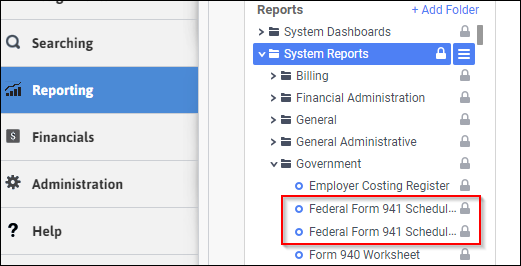
- Access Reporting > Reporting & Analytics > System Reports > Government.
- Select Federal Form 941 Schedule A Worksheet to open the workflow view in a new tab or select Export As and choose the desired file type for the export.
- All fields: Corporation, Quarter, and Year, are required to complete the workflow. Click on the buttons to the right of certain fields to open a new window which will allow you to search and select options related to that specific field or choose a date.

- Select the Corporation for which you want to create a report. If you have only one active corporation, it defaults into this field.
- Select the Quarter using the Code Selection control.
- The Year defaults to the current year, but can be changed.
- Click Confirm to generate the report.
-
The report totals number of employees, wages, federal tax withheld, calculated social security wages, medicare wages, calculated medicare wages, additional medicare wages, calculated additional medicare wages, and tax liability for months 1 through 3 for the quarter and corporation.
Corporation name has been removed from the screenshot below.
Full Report
