Government Reporting Register
This report provides information on government reports run on a monthly, quarterly or yearly basis. You can choose from 2 formats and 5 types of output (see below). This report is only available if the system has a back office license.
- Access Reporting > Reporting & Analytics > System Reports > Government or Financials > Financial Processing > Government Reporting> Activities > Reports.
- Select Government Reporting Register to open the workflow view in a new window.
- While updating the form, fields marked in red are required to complete the workflow. Click on the buttons to the right of certain fields to open a new window which will allow you to search and select options related to that specific field or choose a date.
-
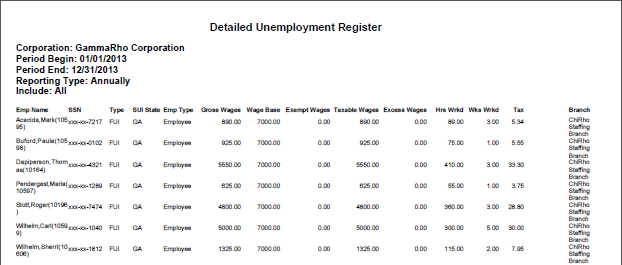
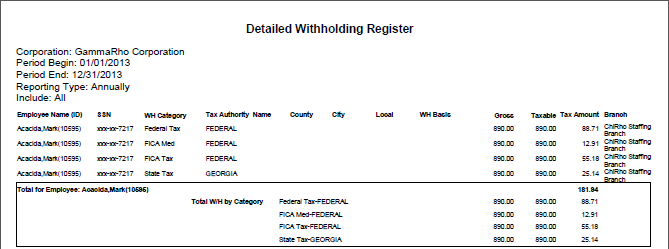
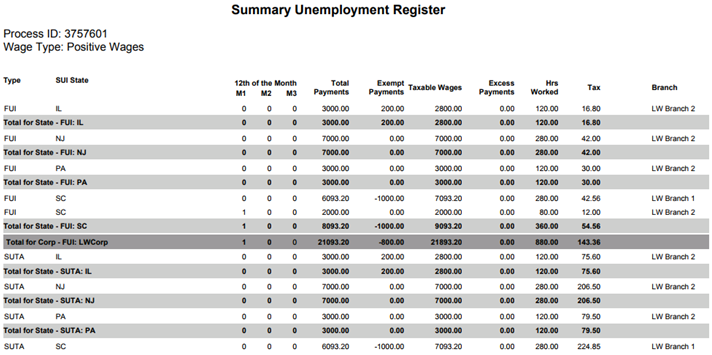
The initial workflow window allows you to select the Format (Process ID or Reporting Period) and Output (Deduction Register, Detailed UE Register, Detailed W/H Register, Summary UE Register and Summary W/H Register). Your selection of Format determines the contents of the second workflow window. Your selection of Output determines the contents of the report.
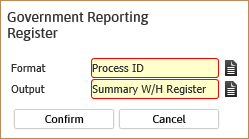
- If you select the Process ID format, the next screen prompts for the process ID and whether you want to include positive, negative or all wages. When you have entered the required information, click Confirm to get a report or Export to Excel to get a spreadsheet. You can also use the lookup icon to search for the process by corporation, submitted by and /or submitted from/to dates.
- If you select the Reporting Period format, the next screen prompts you for a corporation, period begin/end dates, reporting type (Annually, Monthly, Quarterly) and Wage Type (Positive, Negative or All Wages). Once this information has been entered, click Confirm to get a report or Export to Excel to get a spreadsheet.
Full Report
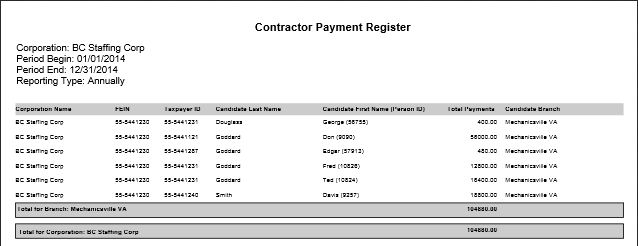
Contractor Payment Register
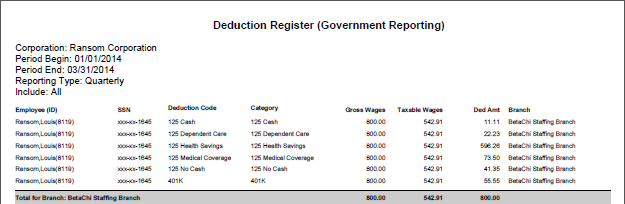
Deduction Register
Detailed Unemployment Register
Detailed Withholding Register
Summary Unemployment Register
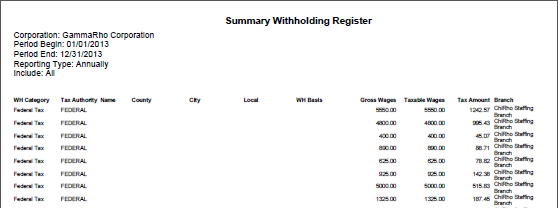
Summary Withholding Register