September 2026 Release: Omnitable New Features & Enhancements
Job Board Applications Omnitable
-
Feature: Omnitable
-
Level of Configuration: None
From this release forward, you will be able to add a “Job Board Applications” Omnitable to Job records. You will get all the Omnitable features and greater functionality and flexibility than a standard Related List.
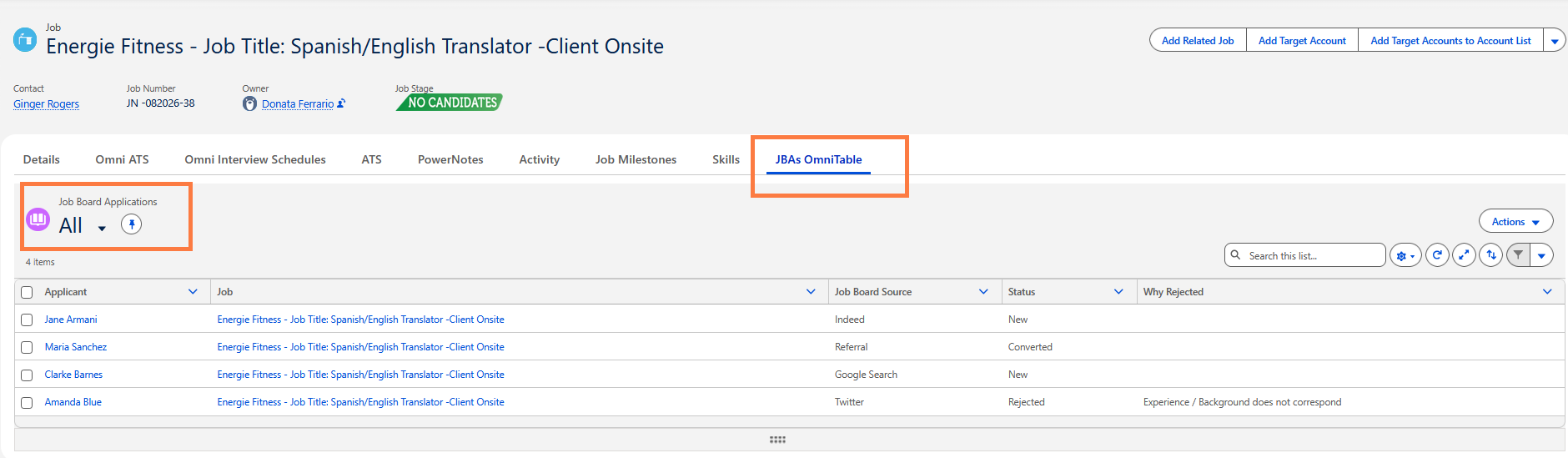
Out of the box these Columns are shown, but they can be customized:
-
Applicant
-
Job
-
Job Board Source
-
Status
-
Why Rejected
Under the Actions dropdown, you will see the following options:
-
Reject
-
Convert
Configuration
-
Go to . This is the JSON configuration that contains the out of the box configuration that users can customize.
-
To add the “Job Board Applications” Omnitable to Job records, follow the instructions provided in Omnitable Configuration Guide > Step 2: Add an Omnitable as ‘Standalone’ or as ‘Related List’ to any object. When entering the "Omnitable API Name" in the Lightning page, just enter JBA.
Please note that:
-
When selecting Candidate and using one of the actions, this is the expected behavior:
-
If selected Candidate’s JBA Status=New: Convert Allowed | Reject Allowed
-
If selected Candidate’s JBA Status=Converted: Convert Not Allowed | Reject Not Allowed
-
If selected Candidate’s JBA Status=Rejected: Convert Allowed | Reject Not Allowed
-
-
Two new Flow-based actions have been packaged as re-usable JBA Reject and JBA Convert actions:
-
AEF_JBA_Reject
-
AEF_JBA_Convert
-