Assigning an Alternate Time Approver
Approvers and managers are assigned in to audit and approve employee time, expenses, PTO, and other data (units, projects, UDFs, etc.). Agency-designated approvers are emailed a link to the Approval Application. No username or password is required.
If you are a designated approver, you may need to set an alternate approver to act in your place while you are out of the office. Follow the steps below to set an alternate approver from the Approval Application.
- From inside the Approval Application, click Alternate Approver in the upper right hand corner.
- The Add Alternate Approver window will pop up. Fill out the following information:
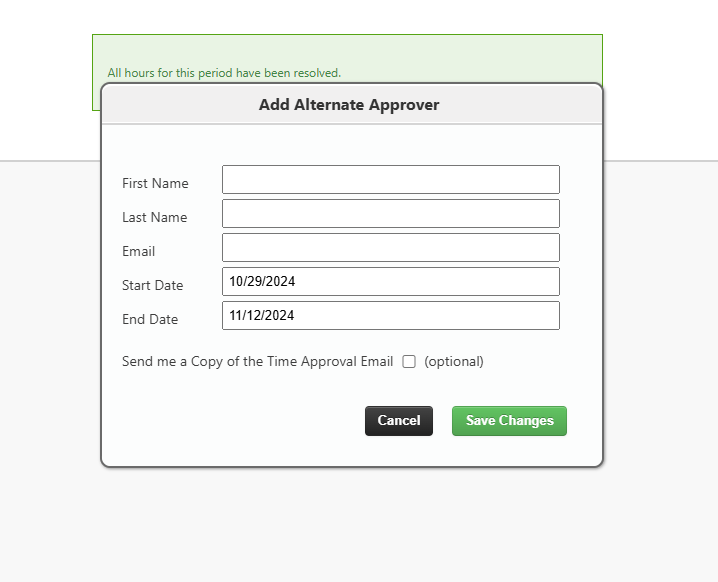
- First Name: The first name of your alternate approver.
- Last Name: The last name of your alternate approver.
- Email: Your alternate approver's email address.
- Start Date: The date your alternate approver should start.
- End Date: The date the alternate approver should stop.
- Send me a Copy of the Time Approval Email check box: Check this box if you want to receive a copy of the approval email while your alternate is set as the approver.
- Click Save.
For steps on setting up an Alternate Approver from the TMC, see Adding Alternate Approvers.
Was this helpful?