Removing Alternate Approvers
Alternate Approvers can be added if the Primary Approver is not able to approve time for a period. Alternate Approvers can be set up in the TMC and through the Approval Application, which is accessed through the email approval links sent to clients. For more information see Assigning an Alternate Time Approver
Use the Alternate Approver tool only if your change is short term or temporary. If your change is permanent, update approver details in your Front Office System so BTE can pick up the correct information via refresh.
- Navigate to the appropriate Group in the Time Management Console (TMC).
- Click the Unapproved Time tab.
- Click on the Approver’s information.
- Under Alternate User Info, click Remove alternate user.
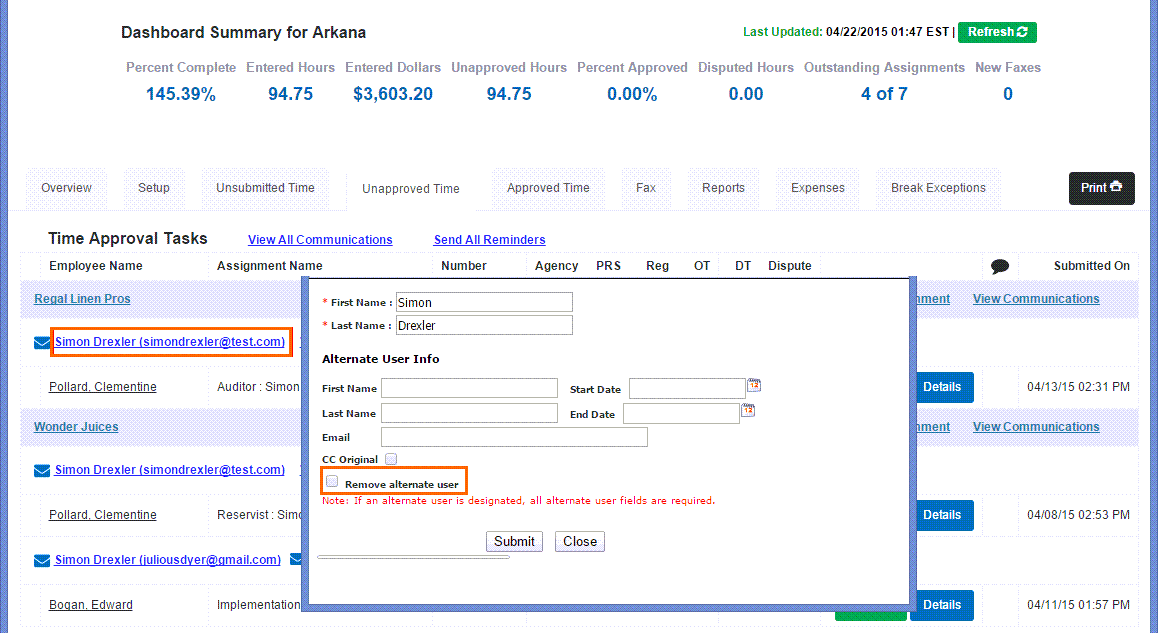
- Click Submit .
Was this helpful?