ACA Approaching Eligibility Report
The ACA Approaching Eligibility Report is designed to allow you to review a list of those employees whose Eligible Hours in Employee ACA Details have met or exceeded the number of hours set up in the Warning Threshold field on the Corporation's ACA record in Administration AND who do not have a Coverage status of Accepted.
- AccessReporting > Reporting & Analytics > System Reports > Management.
- Double-click ACA Employees Approaching Eligibility Report to enter report criteria.
-
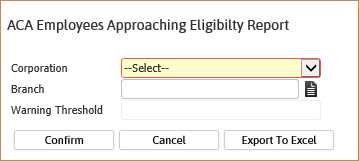
After selecting the report, the ACA Employees Approaching Eligibility Report workflow will open for selection criteria input.
- While updating the form, fields marked in red are required to complete the workflow. Click on the buttons to the right of certain fields to open a new window which will allow you to search and select options related to that specific field or choose a date.
-
Select a Corporation.
Once you select a corporation, the warning threshold from the ACA record in Administration automatically defaults. This is a read-only field and may not be edited here. If you are combining data for multiple corporations, select <Combined Corp>.
- Branch Name is optional and can be used to further define the information you want to see on the report.
-
After entering the criteria click Confirm to generate the report. You can also select Export to Excel to get a .csv file of the report.
-
The report opens in a new window.
- The header displays report name and corporation.
- The data is then grouped and sorted by corporation and then branch.
-
Information in report:
- Report is grouped by Corporation and then Employee Branch.
- Report is sorted by Employee Last Name and First Name.
- If there is more than one assignment, the one that uses the maximum end date is used to populate the Current Assignment ID and Estimated End columns.
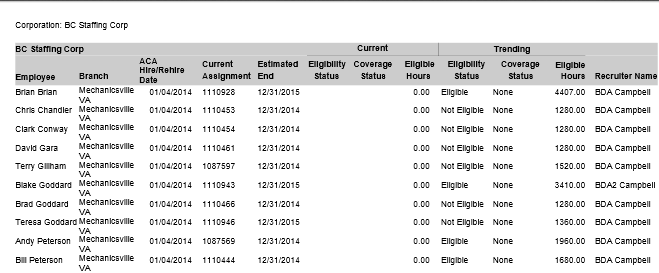
- In the report example below, warning threshold was set at 700.
- The report displays the ACA Hire Date, Current Assignment (see above), Estimated End Date, Current Eligibility Status, Current Coverage Status, Current Eligible Hours, Trending Eligibility Status, Trending Coverage Status, Trending Eligible Hours and Recruiter Name.
- Number of Employees on the report is totalled by Corporation and by Branch.
Full Report