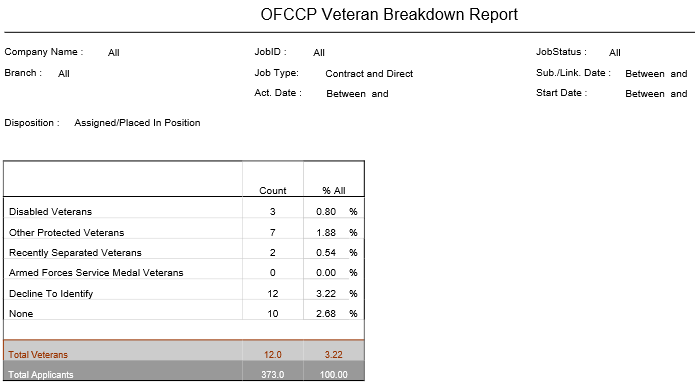
OFCCP Veteran Breakdown Report
This report provides a summary count and percent of all applicants for the search criteria specified, broken out by disposition and veteran status .
- Access Reporting > Reporting & Analytics > System Reports > Management.
- Double-click on OFCCP Veteran Breakdown to open the workflow view in a new window.
- While updating the form, click on the buttons to the right of certain fields to open a new window which will allow you to search and select options related to that specific field or choose a date.
-
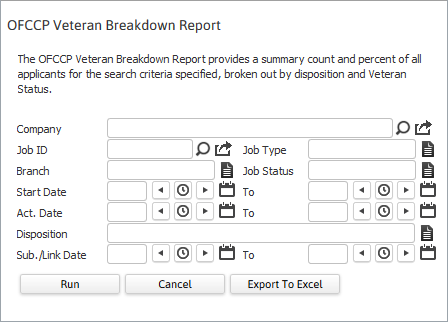
Selecting any of the following criteria to filter the report results. Unless specified, leaving a field blank causes the system to treat it as if you had selected "ALL". For example, if you leave all criteria blank, then the system searches on all companies, all jobs, all job types, all branches, etc.
- Company will report applicants for all Job Orders associated with this Client.
- Job ID will report the applicants for only the Job Order number entered.
- Job Type will report applicants for only the Job Type selected.
- Branchwill report all applicants for all Job Orders within that Branch.
- Job Status will report applicants for all Job Orders with the chosen status.
- Start Date fields will report applicants for all Job Orders whose start dates fall within the chosen date range.
- Act. Date fields will report applicants for all Job Orders created within the date range.
- Disposition will report applicants for all Candidate Submittals that match the chosen disposition.
- Sub./Link. Date will report search details for all applicants linked or submitted within the date range.
-
Click Run to run the report.
-
The header displays the report name, and the criteria used to generate the report.

-
The data is then sorted by Disposition.
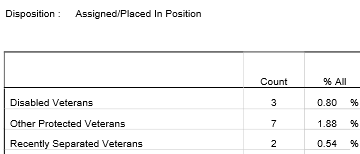
Calculations in report
- Count – total sum for each applicant of the indicated disposition by veteran status.
- Percentage All – percent of total applicants for the indicated disposition who are of the specified veteran status.
- Total Disabled – sum/percent of all Veteran Statuses for the indicated disposition.
- Total Applicants – sum of all applicants (whether or not they indicated a veteran status) for the indicated disposition.
Full Report