Add Data Mapping Profile
This workflow creates a data mapping profile.
Permission for this component is granted via the Manage Data Mapping under the general administration category.
- From the Manage Data Mapping Profiles segment, select the Add Data Mapping Profile workflow from the Activities drop-list.
-
The Add Data Mapping Profile workflow opens in a new window.
- While updating the form, fields marked in red are required to complete the workflow.
- In the Category field, select the type of profile you are creating.
- Map to Adapt defaults to Import and cannot be edited.
- Select whether the profile is active or inactive.
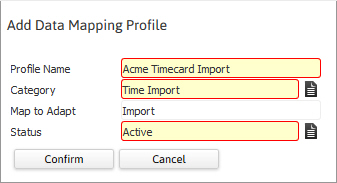
- Clicking Confirm completes the workflow and takes you to the Data Mapping Profile page.
Was this helpful?