Add Fee
The Add Fee workflow allows you to add a Fee PayBill Code record. Fee PayBill Code records can be set up at the Corporation, Client, Job Order and/or Assignment level and are automatically applied by the system when a Timecard containing a fee applicable PayBill Code is posted.
- If, instead, you want to create a PayBill Code that is fee applicable, see Add PayBill Code.
- For an overview on fees, see Fee Overview.
To add a Fee PayBill Code:
- Access Administration > Administration > Manage PayBill Codes.
- On the Manage PayBill Codes page, click Add Fee.
-
The Create Fee PayBill Code page displays.
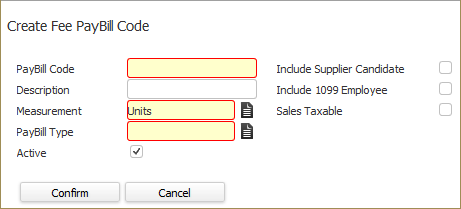
- In the PayBill Code field, type the name by which the code will be referenced. (REQUIRED)
- In the Description field, type a description of the fee paybill code.
- In the Measurement field, click the icon to select between Hours and Units. (REQUIRED)
- In the PayBill Type field, click the icon to select between ACA Fee and Other Fee. If this is an ACA cost recapture fee, select ACA Fee. If this is any other type of fee, select Other Fee. (REQUIRED)
- In the Active checkbox, place a check in the box if this is an active paybill code. Active fee paybill codes can be added at the corporation, client, job order and assignment level. Inactive codes do not show up as an option.
- If you want this fee automatically applied to a timecard for a Supplier Candidate (if at least one of the codes on the timecard is fee-applicable), place a check in the Include Supplier Candidate checkbox. If this is not checked, this fee will never be applied if the timecard is associated with a Supplier Candidate.
- If you want this fee automatically applied to a timecard for a 1099 Employee (if at least one of the codes on the timecard is fee-applicable), place a check in the Include 1099 Employee checkbox. If this is not checked, this fee will never be applied if the timecard is associated with a 1099 Employee.
- If you want this fee code to be sales taxable, place a check in the Sales Taxable checkbox.
- Once you are satisfied with your selections, click Confirm to create the fee PayBill Code.
Was this helpful?