Add PayBill Code
This workflow creates a non-fee paybill code record.
Permission for this component is granted via the manage paybill code permission under the financial administration category.
- To create a fee paybill code record, see Add Fee.
- For an overview on fees, see Fee Overview.
- From the Manage PayBill Codes segment, click the Add button below the list box.
-
The Create PayBill Code workflow opens in a new window.
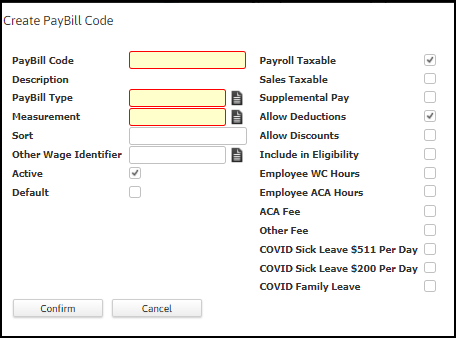
- While updating the form, fields marked in red are required to complete the workflow. Click on the buttons to the right of certain fields to open a new window which will allow you to search and select options related to that specific field.
- Code – unique value for each paybill code.
- Description – a short description of the paybill code.
- Measurement – is either hours or units.
- Sort – Enter a number to indicate the order in which paybill codes are printed on employee check stubs.
- Other Wage Identifier – An additional method to identify this paybill code.
- Active – check this box to set this paybill code as active.
- Default – check this box to set this paybill code as default.
- Payroll Taxable – If selected, indicates payroll taxes should be calculated for this paybill code.
- Sales Taxable – If selected, indicates sales tax should be calculated for this paybill code.
- Supplemental Pay – If selected, indicates this paybill code is considered supplemental pay.
- Allow Deductions – If selected, indicates deductions should be subtracted from this paybill code.
- Allow Discounts – If selected, this paybill code is discountable for invoicing.
- Include in Eligibility – If selected, this paybill code is included when calculating eligibility.
-
Employee WC Hours – If selected, this paybill code is included when calculating employee-paid workers compensation.
The ‘Employee WC hours’ flag is currently not used.
- Employee ACA Hours – If selected, this paybill code is included in the calculation of hours for ACA eligibility.
- ACA Fee – If you want the system to calculate an ACA cost recapture fee whenever this PayBill Code is used on a Timecard, place a check in the ACA Fee checkbox.
- Other Fee – If you want the system to calculate another type of fee whenever this PayBill Code is used on a Timecard, place a check in the Other Fee checkbox.
- COVID Sick Leave $511 Per Day - If selected, *amount paid with this paybill code will be presented in Box 14 on the employee W-2 when government reporting is processed
- COVID Sick Leave $200 Per Day - If selected, *amount paid with this paybill code will be presented in Box 14 on the employee W-2 when government reporting is processed.
- COVID Family Leave - If selected, *amount paid with this paybill code will be presented in Box 14 on the employee W-2 when government reporting is processed.
$ amount thresholds are informational only. Agency is responsible for enforcement of maximums.
- The new code is last in the list box and is accessible via the code link.
Was this helpful?