Add to Talent Pool
Use these instructions to add the candidate/supplier candidate record to Talent Pool folders used in the Recruitment Studio.
- Select Add to Talent Pool from the Activities drop-list.
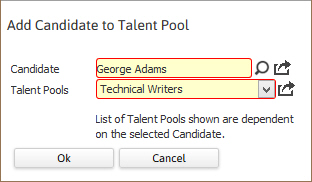
- The Add Candidate to Talent Pool workflow will open in a new window.
-
Select the preferred folder and Ok the workflow to complete.
- A confirmation message will display to confirm the candidate is now listed under that Talent Pool folder in the adapt.studio’s Recruitment Studio widget.
-
To add the candidate to additional Talent Pool folders, repeat the workflow.
“List of Talent Pools shown are dependent on the selected Candidate.” means that once the candidate is added to a folder that folder is no longer visible in the drop down list in the workflow window. This prevents duplicates in the folders since they have a limit of 250 records per folder.
Was this helpful?