Candidate Submittals
Use these instructions for viewing the submittals segment of a candidate.
- Select Submittals in the segments drop-list at the top of the record.
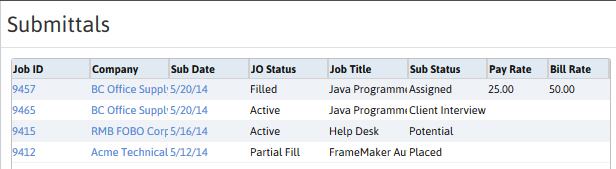
- This segment lists the submittal history for the candidate; each job order the candidate is submitted to, is displayed in the list box.
- Adding a submittal record can be done through the Link to Job and Submit Internally workflows located in the Placement Activities workflow menu; through any of the Assignment or Placement Activities found in the Contract or Direct Job Orders, or through the Placement Center.
- Click on the Sub Date link in the list box to access the submittal record.
-
Click on the blue links to access other records connected to the submittal.
Was this helpful?