Employer Costing Process
The Employer Costing Process workflow runs either a calculation or clearing process to enable you to calculate employer costing (burden).
The Employee Costing process calculates burden based on the selected dates within a specific quarter. While date ranges selected for processing are not required to span an entire quarter, when entering the desired date range, it is most effective to keep the date selections within a single quarter.
-
On the Employer Costing Process Search Results screen, click the Employer Costing Process workflow.
-
The following window displays:
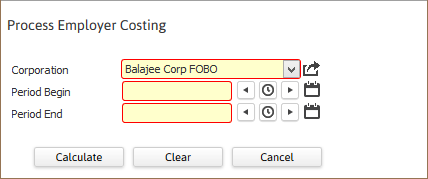
- In the Corporation field, use the droplist to select the Corporation for which you want to run the Employer Costing Process.
- In the Period Begin field, select the beginning date for which you want the process to gather information (or clear information). This date is based on the check date.
- In the Period End field, select the end date for which you want the process to gather information (or clear information). This date is based on the check date.
-
Once you are satisfied with the information entered, you have 3 options. Calculate uses your period begin and end dates and creates a pool of data you can use when printing the Employer Costing Report (see below for more details). Clear uses the period begin and end dates and removes the costing data for that time period. Bullhorn recommends always running a Clear process before running a Calculate process. This ensures that no obsolete date is "hanging around" inside the data pool. Cancel closes the window without running either a Calculate or Clear process.
If you have already run the GL Export for the Employer Costing transactions, clearing those transactions may result in those amounts being exported again. The Clear process also removes any GL Export flag on the selected transactions. Once the Employer Costing process is run again, those transactions can be exported with the updated information. If you have already exported transactions to GL for the time period indicated, you will need to make any necessary adjustments/reversals manually.
The Calculate process calculates actual burden. Timecard burden amount for non-contractors is calculated by adding the federal unemployment burden, the FICA burden, the Medicare burden, the state unemployment burden, the workers comp burden and any additional burden. Timecard burden for contractors only uses additional burden amounts. Supplier transactions are not supported for Employer Costing calculation.
Finally, keep in mind that this process creates a pool of information from which the Employer Costing Register can pull. For more information, see the Employer Costing Register topic.