Text Opt In/Out
Use this workflo w to update the Text Msg preference for multiple candidates selected within the saved search.
- Hover over Searching on the navigator and then select Saved Results .
- After selecting Saved Results, select a search that matches the corresponding Batch Activity category. For this workflow, your search should be a Candidate Search.
-
In the Activities drop-list, select Batch Processes > Candidates > Calls & Messages >Text Opt In/Out.
You can also open the saved search, select individual records, then run the workflow from the Batch menu inside the search.
-
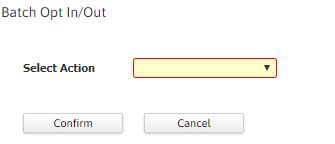
The Batch Opt In/Out workflow will open in a new window.
- Select the required option from the Select Action drop-down list to set the Text Msg preference for the selected candidates.
-
Click Confirm to complete the workflow.
- Once the workflow is completed, the Text Msg checkbox in the Summary screen of the selected candidates will be checked/unchecked based on the selected preference.
Was this helpful?