Amplify Tab
You need Bullhorn Amplify Edition to use this feature.
The Amplify tab is your activity dashboard for individual Candidate, Contact, and Job records.
It brings key insights and recommended actions directly into the record you’re viewing. It highlights recent activity, surfaces useful context, and suggests meaningful next steps so you can keep momentum without switching screens.
Use the Amplify tab when you want deep visibility into one Candidate, Contact, or Job. If you need a broader view across all records, switch to Amplify Overview.
Accessing the Amplify Tab
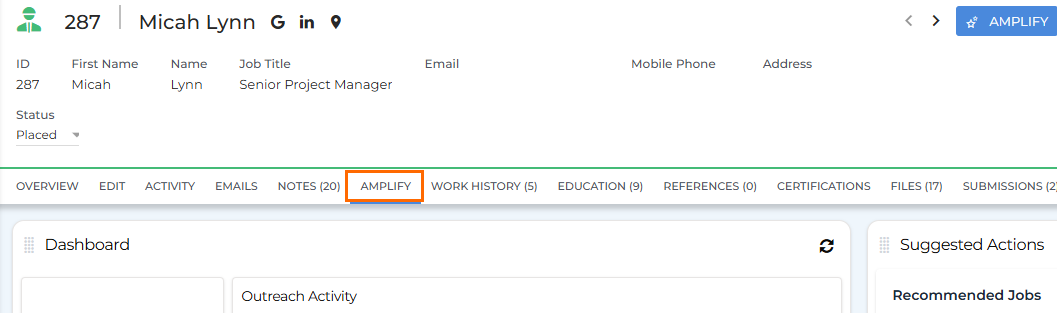
To access the Amplify tab, open a Candidate, Contact, or Job record and select Amplify from the list of tabs.
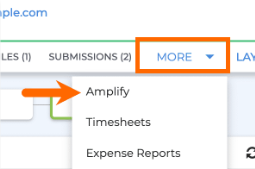
If you don’t see Amplify in the tab bar, click More and select Amplify from the drop-down.
Candidate & Contact Amplify Tab
On Candidate and Contact records, the Amplify tab helps you track activity, understand communication history, view campaign engagement, and act on AI-powered suggestions. The cards on this tab give you context at a glance and help you decide exactly what to do next.
You’ll see the following cards:
Dashboard
The Dashboard card gives you a quick snapshot of this person’s journey through your pipeline. It shows totals for
Communication
The Communication card displays a chronological timeline of communication associated with this record in the last 90 days, including emails, calls, texts, and meetings. It’s designed to refresh your memory before you reach out. You can also use it to see whether someone is actively engaging with messages you’ve sent.
For messages sent through Bullhorn Automation, only the message subject and date are visible in this card. The full message content is not available.
Active Outreach Campaigns
The Active Outreach Campaigns card shows which Amplify Outreach campaigns this person is currently enrolled in, with enrollment date, status, and the step they’re on. This helps you understand what automated communication they’re already receiving so you can time your manual outreach appropriately.
Suggested Actions
The Suggested Actions card provides AI-powered recommendations for next steps based on the person’s current status, recent activity, and screening results.
Common Suggestions include:
-
Send Screener
-
Recommend Jobs
-
Add to Outreach Campaign
-
Start Submission Packet
Recommendations appear when they’re most relevant, helping you prioritize high value actions and discover useful Amplify features in context.
Outreach Enrollment
The Outreach Enrollment card lets you quickly add the Candidate or Contact to an Amplify Outreach campaign.
Always open each message in the campaign before enrollment. Make sure merge fields populate correctly and that generated content looks accurate and complete.
It’s also helpful to check the Active Outreach Campaigns card first to avoid enrolling someone in a duplicate or conflicting campaign.
Job Amplify Tab
On Job records, the Amplify tab focuses on hiring progress
You’ll see the following cards:
Job Progress
The Job Progress card displays a visual pipeline showing how many candidates are at each stage of the hiring process (
Candidates in Screener
The Candidates in Screener card lists all candidates being screened for the job, including scores, statuses (complete, incomplete, invited), and dates. You can sort by score to identify top performers and review where candidates might be stalling.
Suggested Actions
The Suggested Actions card surfaces AI-powered recommendations based on the job’s pipeline status and recent activity.
Common Suggestions include:
-
Add Screening Questions
-
Review High Scorers
-
Source More Candidates
-
Follow Up on Submissions
These insights help you take timely action and keep the job progressing smoothly.
Screening Questions
The Screening Questions card lists all screening questions assigned to a job, including both AI-generated and manually added questions, organized by category. You can add, edit, or remove questions directly via this card. Keeping these questions updated helps ensure your screening process is aligned with job requirements.