ACA Eligibility & Activity Report
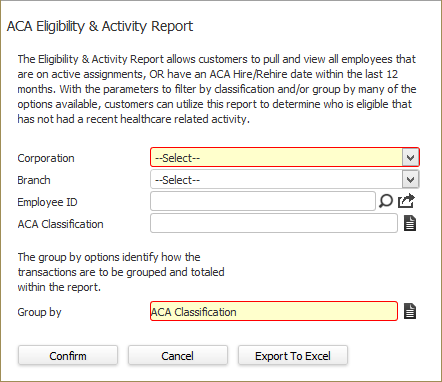
The ACA Eligibility & Activity Report allows you to view employees that are on active assignments OR have an ACA Hire/Rehire date within the last 12 months. Using the parameters to filter and group by the options available, you can utilize this report to determine who is eligible that has not had a recent healthcare activity.
Preparing to run the report
- Access Reporting > Reporting & Analytics > System Reports > Management.
-
Double-click on ACA Eligibility & Activity Report. The ACA Eligibility & Activity Report page displays. Select a Corporation using the droplist (if you are using combined corporations, select <Combined Corp>). Use the Code Selection icon to select a Group By (options are ACA Classification, Current Coverage Status, Trending Coverage Status, Current Eligibility Status and Trending Eligibility Status). You can also select a Branch, Employee ID and/or ACA Classification. When you are satisfied with your parameters, click Confirm to run the report or click Export to Excel to export the report to an Excel spreadsheet.
The Report
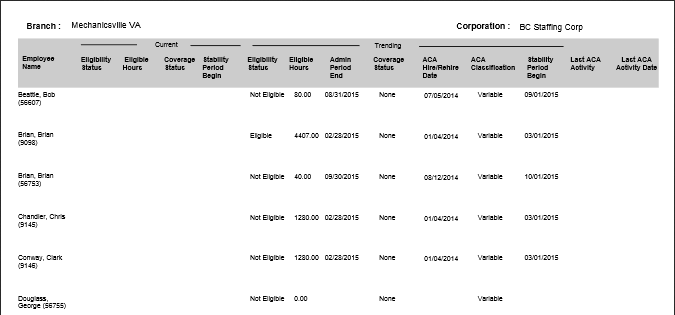
- The header displays the report name, Corporation and Group By options.
- The report is grouped by Corporation, Branch and ACA Classification.
- The report is sorted by employee last name.
- No totals are given on the report.
- The report displays Employee Name (and ID), Current Eligibility Status, Current Eligible Hours, Current Coverage Status, Current Stability Period Begin, Trending Eligibility Status, Trending Eligible Hours, Trending Admin Period End, Trending Coverage Status, Trending ACA Hire/Rehire Date, Trending ACA Classification, Trending Stability Period Begin, Last ACA Activity and Last ACA Activity Date.