Branch Corporation
The branch is linked to a corporation record for federal tax reporting purposes. The default you select here will default into Job Orders you create. There is a one to one relationship between a branch record and a corporation; but a multi relationship between the corporation and branches. Manage this relationship via the Corporation segment.
- Select Corporation in the segments drop-list.
-
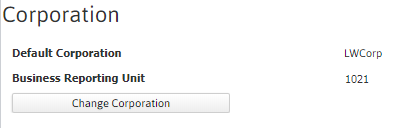
The corporation that the branch is linked to is listed on the segment.
-
Click the corporation name to view the corporation record.
-
-
Click on the Change Corporation button to modify corporation.
- Select the Corporation by clicking the droplist.
-
Enter the Business Reporting Unit value.
The Business Reporting Unit value is required for Corporations that have employees/worksites/branches in the State of IOWA and is included in the IOWA quarterly unemployment submission file.
- After updating the Corporation and/or Business Reporting Unit, click Confirm to keep changes or Cancel to discard.