Delete Code
This workflow will remove a code from a selected list.
Permission for this component is granted via the manage code list permission under the general administration category; default with general and financial administration security profiles.
- Select a list from the box and click the Select List button.
-
The codes in the list are displayed in a box at the bottom of the segment.
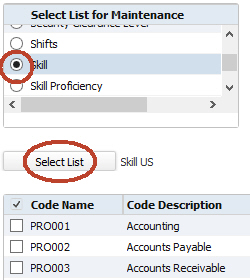
- Select a code or multiple codes by placing a check in the box to the left of the Code Name. Clicking on a box toggles it between checked and unchecked. Click Delete.
-
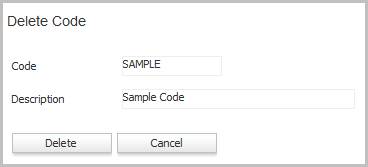
The Delete Code workflow will open in a new window.
If you are deleting multiple codes, a different window displays asking if you are sure. If you are, click Confirm on that window.
You may not add, edit or delete a parent code on these lists:
- Contact Log a Call Outcome
- Candidate Log a Call Outcome
Was this helpful?