Edit Code
This workflow will modify a code in a selected list.
Permission for this component is granted via the manage code list permission under the general administration category; default with general and financial administration security profiles.
- Select a list from the box and click the Select List button.
-
The codes in the list are displayed in a box at the bottom of the segment.
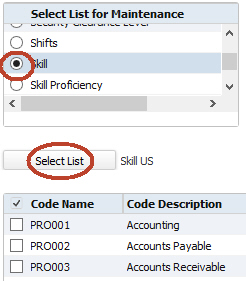
- Select a code from the box and click Edit below the box to modify.
-
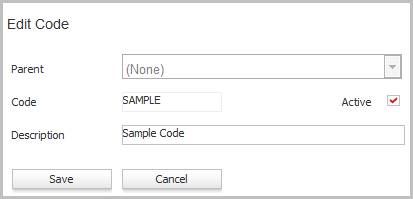
The Edit Code workflow will open in a new window.
- The code and description cannot be a duplicate of an existing code.
- Remove the Active flag to hide the code in the list.
- Clicking save will complete the workflow and return to the code list.
-
If you are editing a skill, job category or certification, the Edit window has two additional fields:
- Web Portal Description: This is how the skill, job category or certification will be presented to the web portal user. It can be the same or different from the Description used in Adapt.
- Web Portal: This checkbox determines whether the skill, job category or certification will be available for selection to the web portal user. A check means the skill, job category or certification will be available. An unchecked box means that it will not be available. If none of the codes have the Web Portal flag checked, 'No matches found' is displayed in the web portal fields.
Neither the Parent field nor the Code field may be edited. To set a new parent for a code or to change the code name, delete the original code and add a new one. NOTE: Some lists do not allow parent/ child codes. In this case you will not see a Parent field.
You may not add, edit or delete a parent code on these lists:
- Contact Log a Call Outcome
- Candidate Log a Call Outcome