Amplify LLM Model Upgrade: October 2026
On October 21-22, Bullhorn is moving from the OpenAI 4.1-nano model to the OpenAI 5.6-luna model. This includes upgrading the large language model (LLMClosed) that powers Amplify Chat, Amplify Outreach, Amplify Present, and Amplify Enrich to a newer model that will deliver improved results.
The upgrade will happen automatically, and no action is required. Amplify Admins can test their Amplify Chat prompts before the upgrade and decide whether Bullhorn updates them. We'll notify you when the upgrade is complete. No other Amplify skills and features will be affected.
-
Monday, October 19 at 11:59pm EDT: Deadline to decline automatic prompt updates by filling out our form.
-
October 21-22: Bullhorn upgrades the LLM
 An AI language model (or LLM) is a system trained on large amounts of text that can read, interpret, and generate human-sounding language. Amplify uses one to read your Bullhorn records and produce output based on the prompts you configure. It does not search the internet or access outside data on is own. It only works with what you give it. and prompts automatically.
During the upgrade, Automation Enrich step activities will be temporarily paused for 24 hours. This includes automations that use Enrich steps, which may result in processing delays until the upgrade is complete. Other automations will continue to operate normally.
What to Expect From the Amplify LLM Upgrade
For Amplify Chat, you may notice some differences in the output. Because of this, some prompts may require updating, and we recommend that your prompts be checked and updated if necessary so they produce the results your teams expect.
We recommend that you hold off modifying or adding new saved prompts on October 21-22 while the LLM upgrade is occurring.
We may update your Amplify Chat prompts
The Bullhorn Amplify team will check your existing prompts and may update them to work with the new model by October 21-22. If you’d like for us to handle this, you don’t need to do anything.
Your prompts often carry business nuance and context that only your team knows. If you’d rather make these updates yourself, fill out our form by Monday, October 19 at 11:59pm EDT to decline automatic prompt updates. We'll leave your prompts as they are so you can update them yourself.
Testing Amplify Chat Prompts on the New LLM Model
Amplify Admins can test existing prompts on the new model now, before the upgrade on October 21-22.
-
Go to .
-
Click the Prompts tab.
-
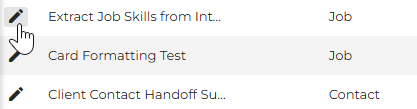
Click the edit icon next to the prompt you want to test.
-
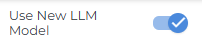
In the right-hand panel, turn on Use New LLM Model.
-
Click Update to generate a response with the new model.
Compare the result with what you get today, and adjust the wording or other parameters if you'd like to fine-tune it. We suggest starting with your company-wide prompts and the ones your teams rely on most.
The Use New LLM Model toggle applies only to the prompt you're testing. You'll need to turn it on each time you test a different prompt. Use New LLM Model doesn't switch on the new model anywhere else in Bullhorn or for any other users.
Tips for Adjusting Your Amplify Chat Prompts for the New Model
-
Duplicate before you edit. If a prompt needs changes for the new model, start by duplicating it. You can test and refine the copy while your existing prompt keeps working as it does today. When you’re happy with the new version, replace the original.
-
Format, level of detail, or ranking can shift even when nothing is wrong with your prompt. If that happens, make a few small adjustments to bring things back: say what output format you want, list your priorities, and any rules the model should follow.
-
Use an AI tool to help. Put the following prompt into your preferred AI tool: "Bullhorn is moving from 4.1-nano to 5.6-luna, and I need help adjusting this prompt to get a similar or better output. Here is the prompt I am using in 4.1-nano: [paste prompt]"
FAQ: Amplify LLM Model Upgrade
Why is the model changing?
The underlying models used by Amplify are periodically updated as newer models become available and older models are retired. These updates help Amplify continue using current model technology.
Do I need to do anything to get the new model?
No, the upgrade happens automatically on October 21-22. We do recommend that admins test company-wide prompts beforehand, so you can be confident they still give you the results you want.
Can non-admin users test the new model?
No. The test option is available only in Amplify Prompt Studio within Amplify Admin, so it's limited to admins who can manage prompts.
What should I test first?
Start with the prompts your teams rely on most, especially prompts that require precise formatting or structure, such as resumes, job descriptions, or candidate summaries. Highly customized or complex prompts are also good candidates for early testing.
How can I adjust a prompt without affecting what my users use today?
Duplicate the prompt and use the copy for testing. This lets you refine the prompt for the new model without changing the version your users currently rely on. When you are happy with the results, you can replace the existing prompt.
What if a prompt doesn't work the same on the new model?
Small adjustments, such as being explicit about output format, priorities, and any rules the model should follow, usually restore the results you expect. Our Amplify Prompting Best Practices article has more guidance on building effective prompts.