Knowledge Base
helps staffing firms grow and scale by simplifying complex reporting and delivering desk-level insights to recruiters. With you can dive into any performance metric, unlock revenue opportunities and mitigate risks in real-time, on any device.
See Bullhorn Analytics Editions for details of the features available with each edition.
Menu Options
Use SSO to access .
Click on the  icon in the top right corner to open the menu.
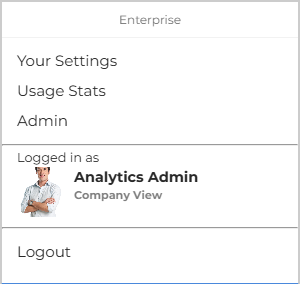
Depending on your user permissions, you'll see the following options:
- Your Settings: Allows you to set a date format (UK or US) and a display theme for your account.
- Usage Stats: Opens a report of all users at your company with a count of actions taken in Analytics, including accessing different features, running or sharing reports, and making updates. The report can be searched, filtered, and exported as a .CSV file.
- Admin: Takes you to the Admin area of Bullhorn Analytics.
- Logged in as: Shows the user account you are currently logged into. If User Switching is enabled for your user, you'll see a list of Available Users that you can switch to.
- Logout: Logs you out of your current session.
Sections
Was this helpful?