| Edition: All Editions | Audience: All Users |
Metrics Ownership
Metric ownership determines who gets credit for an activity or outcome. Configuring it correctly ensures accurate reporting at both the user and team levels.
Ownership can be configured in different ways depending on the type of metric and how credit should be assigned.
Primary Ownership (Default)
By default, ownership of a metric is assigned to the owner of the most relevant record.
Candidates Added is credited to the Candidate Record Owner.
Use primary ownership when the activity or outcome clearly belongs to a single record owner, such as Jobs Added, Candidates Added, or Placements.
Redirected Ownership
Ownership can be redirected to the owner of another related entity, allowing you to credit the most appropriate role.
Interviews can be credited to the Job Owner instead of the recruiter who logged the interview.
-
Use redirected ownership for activities involving multiple people, when credit should roll up to a specific role (e.g., Job Owner or Account Manager).
-
This helps align reporting with team goals and pipeline ownership, rather than just individual activity logging.
Assignee Ownership
Assignee ownership maps metric credit to the assignees of a record, rather than a single record owner. This supports shared ownership, reflecting the reality that multiple people may be actively working the same job or candidate at the same time.
Assignee ownership can also be remapped to an alternative single-value field in Bullhorn ATS, allowing your organization to use whichever field best reflects how assignees are tracked in your workflows.
A job may have one Job Owner but several Job Assignees, meaning every recruiter working that role shares credit for related activity, rather than credit going to just one person.
Use assignee ownership where multiple users are actively working the same job or candidate and should all receive credit.
Placement Split Ownership
Placement Split ownership is designed for metrics involving placements where multiple people contribute to the placement and a commission split is recorded in the Bullhorn ATS.
Placement splits allow you to assign credit to as many users as needed. You can also assign credit to a specific commission type (e.g., recruiting split only).
By default, Bullhorn applies a 50/50 split between the Job Owner and the user who creates the Placement.
How Placement Splits are Handled in Bullhorn Analytics
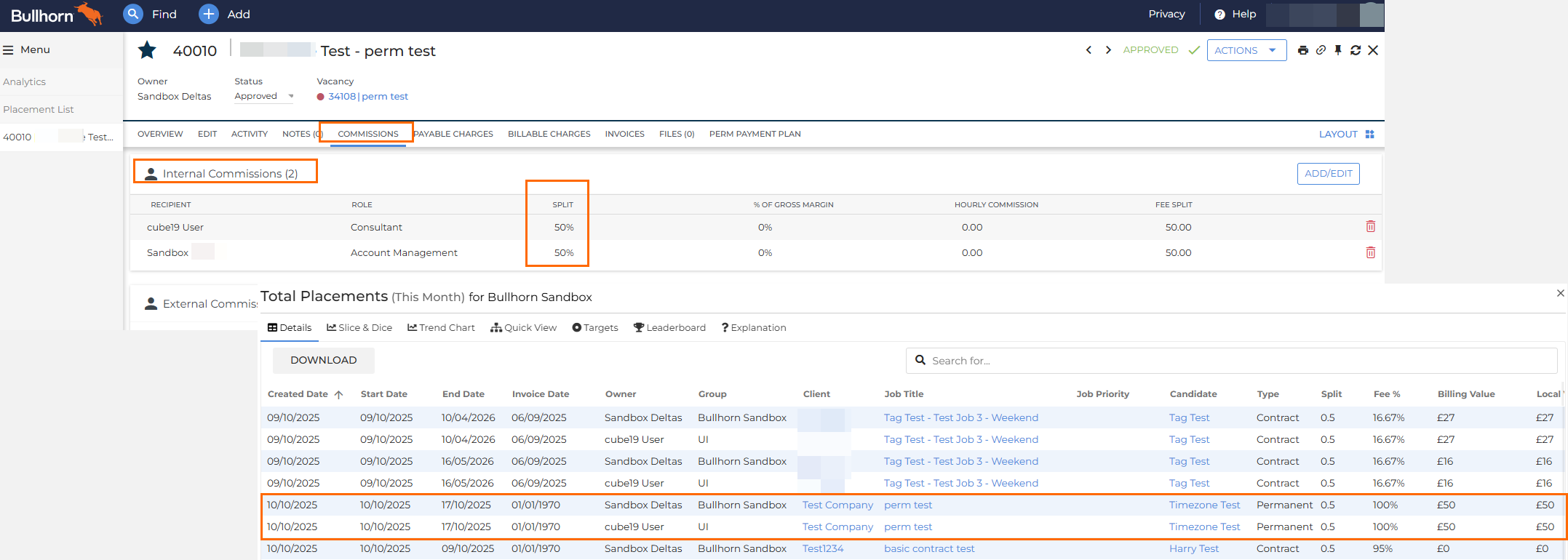
Placement records may appear to be duplicated in Bullhorn Analytics when a commission split is applied (e.g. 50/50), but this is intentional and not an error. This occurs due to how ownership data is sourced and displayed at the group level.
-
Bullhorn Analytics pulls placement credit splits directly from the Internal Commissions section of the Placement's Commissions tab in Bullhorn ATS.
-
When multiple users are listed in the ATS Commissions tab, Bullhorn Analytics will show a separate record for each user at the group level.
-
All placement details across these records are identical; only the Owner and Group fields differ, ensuring accurate representation for each credited party.
-
If the same user appears twice for a 50/50 commission split, it means the commission has been (inadvertently) split between the same user. You can update the commission split to be 100% for that user to ensure they only appear once in Analytics.
How to Change Placement Split
To eliminate duplicate placement records in your Bullhorn Analytics application you'll need to adjust the commission split in Bullhorn ATS to assign 100% credit to a single user:
-
Open the relevant Placement record in Bullhorn ATS.
-
Go to the Commissions tab.
-
In the Internal Commissions section, update the split so that 100% of the credit is assigned to one user.
This ensures only one record appears in Bullhorn Analytics and that placement ownership has been attributed to a single user.
Use Placement Split ownership for placements with multiple contributors where accurate credit-sharing is needed for reporting and commission calculations.
Metric Ownership Considerations by Edition
This table details the varying ability to change metric ownership based on your edition of Bullhorn Analytics.
| Edition | Ability to Change Ownership | Details |
|---|---|---|
|
Starter |
No |
Ownership is set during implementation, and cannot be changed. |
|
Growth / Corporate |
Limited Support (Bullhorn Support required) |
Changes can only be made by Bullhorn Support and are strictly limited to the ownership of these key activity metrics: CVs Sent, Interviews, Meetings, and Offers. Ownership for non-activity metrics (like Placements or Sales) cannot be changed. Note: The ownership change can only be applied universally to all 4 activity metrics or none. |
|
Enterprise |
Yes |
Enterprise Edition Metrics Admin users can change ownership for most metrics themselves using the Metric Editor, as long as the application allows for it. |
FAQ
Can I make sure my metric tracks ownership by Job Owner instead of Recruiter?
Yes, but only Enterprise edition Metrics Admin users can change this directly. If the metric is connected to the Job entity, you can change the ownership configuration to assign activity to the Job Owner rather than the default Recruiter.
Can ownership be changed after an activity is logged?
Yes. If the underlying record owner or assignee changes, ownership of related metrics will update automatically.
Can I report on both Owner and Assignee at the same time?
Yes. You can view both the owner and assignees in the metric clickthroughs across all editions. However, only Enterprise edition allows you to manipulate these data changes using tools like Slice & Dice and Dashboards to gain deeper insights.
How do placement splits affect commissions reporting?
Placement splits directly feed into reporting on commissions if your organization uses that data for payout calculations. Each split ensures contributors get the right share of credit.
Why does my placement record appear twice in Bullhorn Analytics when there is a 50/50 split?
The duplication is not an error, it's intentional since Bullhorn Analytics shows one record for each credited user. Because the placement's Internal Commissions are split (e.g., 50/50), the system must generate a separate, identical record for each user at the group level to ensure both parties receive full credit for the metric. If the same person appears on both lines, you should correct the split by changing the commission in the placement commissions tab to a single line with 100% credit for that user.