Resetting Your Bullhorn Password
You may be asked to reset your password when you sign in to Bullhorn ATS as part of a security change Bullhorn has made to help protect accounts. For service updates, visit status.bullhorn.com.
Customers using single sign-on (SSO) do not need to reset their passwords.
ATS: Reset your password
The following password reset instructions and requirements apply specifically to Bullhorn ATS users. For other products, refer to the Bullhorn Platform Incident Customer FAQ for the latest login process.
-
Open your usual Bullhorn ATS sign-in page in a browser.
-
Enter your Bullhorn username and current password. If you are prompted to reset your password, follow the on-screen instructions.
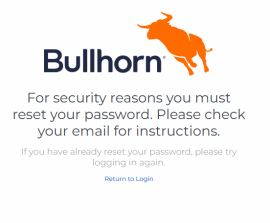
-
Check the email address associated with your account.
-
Open the most recent Bullhorn password-reset message from noreply@bullhorn.com and follow the instructions to choose a new password.
Choose a unique password that you do not use for other services. Never share your password or sign-in code.
-
Return to Bullhorn ATS to sign in using your new password.
ATS: What administrators can do
-
Tell users to follow these instructions if they are prompted to reset their password.
-
Check that users have access to the email address associated with their Bullhorn account.
-
If a user cannot sign in or needs help with their account, contact Bullhorn Support.
ATS: Frequently asked questions
Why am I being asked to reset my password?
Bullhorn has updated security requirements to help enhance account protection. Resetting your password ensures your account meets these updated security standards.
I use single sign-on. Do I need to do anything?
Continue using your organization’s usual single sign-on process.
I use the mobile app. What should I do?
If the app asks you to reset your password, complete the reset in a web browser first. Then return to the mobile app and sign in with the updated password.
Will Bullhorn Support ask me for my password?
No. Bullhorn Support will not ask you for your password. Never share your password.
Where can I get updates?
Visit status.bullhorn.com. You can subscribe to notifications there.
Who do I contact?
Start with your Bullhorn administrator. Authorized Support and Account contacts can contact Bullhorn Support.
I did not receive a reset email. What should I do?
-
Wait a few minutes for the email to arrive.
-
Check your spam or junk folder.
-
Confirm that you are using the correct username for login.
-
If you still cannot sign in, ask your administrator to contact Bullhorn Support.
What if I still cannot sign in?
Verify that you are entering your exact Bullhorn username (not your email address) and check that Caps Lock is turned off. If issues persist, reach out to your internal Bullhorn administrator for support.
How do I know a reset email is from Bullhorn?
A password-reset email should arrive only after you try to sign in with your Bullhorn username and password. Check the sender, which will be noreply@bullhorn.com.